"A meek endeavor to the triumph" by Sampath Jayarathna
Showing posts with label Technology. Show all posts

Friday, March 11, 2016

How to block Youtube Video from a Channel or block entire Channel - for Annoyed Parents :)

If you have younger kids, I bet you are already annoyed by some of the YouTube channels. My 6 year old recently started having an affinity for Minecraft games and for some reason he kind of addicted to game play videos on YouTube channels, and to these channels/people who play the Minecraft and voice over the game action. Some of these adult players use foul language and I don't want to have my kid listens to these crap all day long. I don't mind if he watches cartoons or any other educational videos, but I hate some of these channels like "Annoying Orange", "Stampy", "Stampylonghead" etc.

So, I found a great browser add-on to block these channels. If you are using chrome, you are in a luck. Here's how to block these YouTube channels

Install Video Blocker on Chrome

Follow this link and download the extension for Chrome by clicking on the “Free” button.


When the “Confirm New Extension” box pops up, be sure to click on “Add”. Once it has been installed, you can block channels in one of two ways.

Using Right Click on Video short cut Menu 
Find the thumbnail for a video, any video, made by this channel. Right click on it and select “Block Videos From this Channel”. That’s it!


Using Option Menu (You can restore some channels using this method)


Under the Chrome Menu button in the upper right corner of the browser, select Settings. From there, click on Extensions and under “Video Blocker” click on “Options”. If you have a TON of channels you dislike, you can actually load them via a .csv, but If you are really that heated about hundreds of channels I’ll let you go figure out how to do that bit yourself. To do it one at a time, click on the plus button.

Type the channel name into the box provided and click “Add”. One thing to note here, everything you enter is case-sensitive, so videos from a channel named 'VAVO' will not be hidden when you add 'vavo'. The same goes when using the wildcard feature, which blocks multiple channels containing the same text string.

So whether you like it long or short, this is a quick and easy method to remove a channel from your sight forever. (or until YouTube makes a major update and breaks the extension, which happened yet thanks to constant updates from the creator)

Monday, February 22, 2016

Next big thing in Computing? (Chris Dixon Article link included)


What’s Next in Computing?

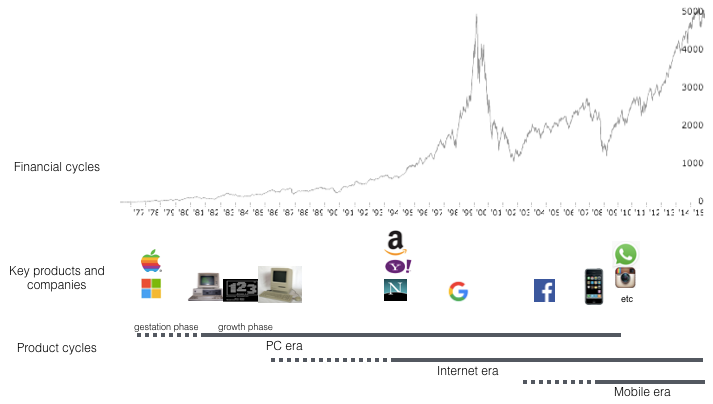
The computing industry progresses in two mostly independent cycles: financial and product cycles. There has been a lot of handwringing lately about where we are in the financial cycle. Financial markets get a lot of attention. They tend to fluctuate unpredictably and sometimes wildly. The product cycle by comparison gets relatively little attention, even though it is what actually drives the computing industry forward. We can try to understand and predict the product cycle by studying the past and extrapolating into the future.


Read the full article at the original post here

Wednesday, September 09, 2015

More updates about new Sony A6100/A7000 possible release date Sep. 11


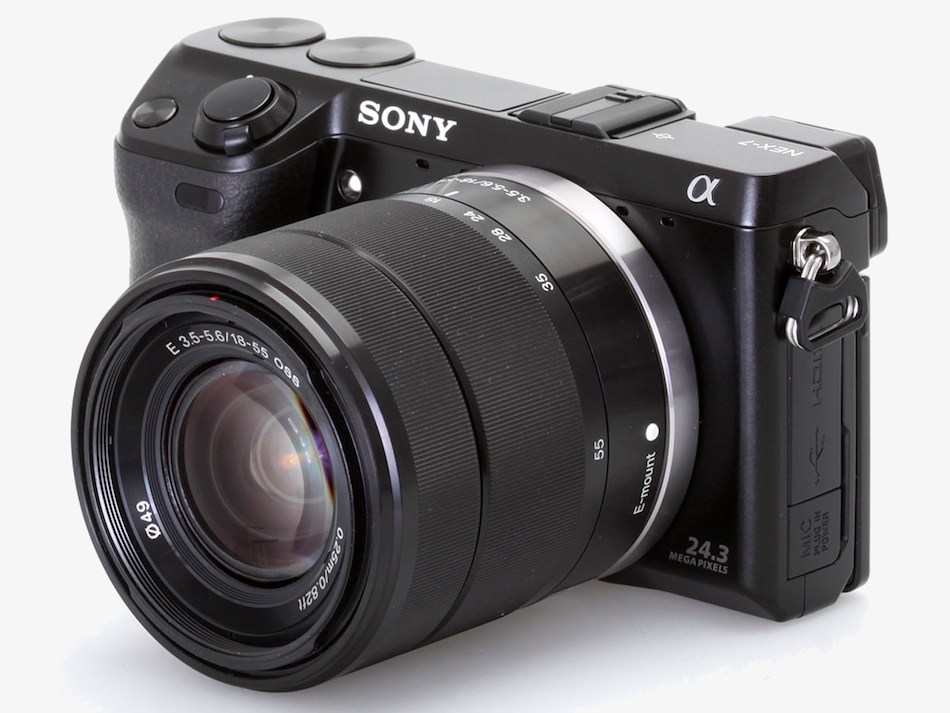
Here's some more news about the soon to be announced (September 11) new Sony E-mount camera. News source sonyalpharumors. See my previous post for more details of previous possible features.

UDPATED POST: I got two anonymous sources sending me two different A6100 info. So either both or one of them is wrong, or we have two different cameras coming:

Source_1:Sony A6000 successor will be announced on September 11. A6100 will support UHS-II SD cards with a maximum write speed of 173 MB/s. It will have a new 24 megapixel sensor with 15% better ISO performance. There won’t be 4K video recording capability. There won’t be a silver version anymore, only black.
Source_2:just saw your latest post and want to say that a6100 or a6000II will have 4K 100mbps but no full readout like a7rII s35 mode. 32mp but not 24mp BSI sensor, and yes with 15% better noise performance. price is unknown yet. It will also have a larger T* viewfinder 0.75x

Tuesday, September 01, 2015

Sony A6100/A7000 has a new backlit sensor and RGBW pixel array.

More news about the soon to be announced new Sony E-mount camera.
1) Sony is preparing the next step in video quality and experience
2) This is an interchangeable lens camera with
– Best in class low light performance (backlit sensor and RGBW pixel array)
– internal 4k video recording with full sensor readout in 60fps
– extremly fast autofocus system

The built-in “RGBW Coding” function which adds W (White) pixels to the conventional range of RGB (Red-Green-Blue) pixels has realized higher sensitivity, enabling high-quality shooting with low noise even in dark indoor or night settings.While the addition of W (White) pixels improves sensitivity, it has the problem of degrading image quality. However, Sony’s own device technology and signal processing realizes superior sensitivity without hurting image quality.

Possible release dates: There is the IFA in Berlin (Sept. 7) and the IBC in Amsterdam (Sony press day on Sept. 11).

Wednesday, August 12, 2015

Sony a6000 Mirrorless camera - Black Friday November 2015 Price Prediction

Test the limits of your creativity with the premium mirrorless DSLR that's focused on speed. Every artistic shot you take-from fast-action to candid-benefits from 24.3MP detail and the world's fastest auto focus. For capturing crucial moments that go by in a blink, the A6000 can shoot 11 photos in one second. It's compact and easy to use, too. Two quick-access dials let you change settings on the fly. Very intuitive.

During the previous Black Friday 2014, Sony a6000 with kit lens listed for $599 and body only for $448. Its older brothers, a5000 with lens for $298 and a5100 body for $348.

Sony Alpha A6000 (body) on Amazon $448 ($200 off)
Sony Alpha A6000 with 16-50mm lens on Amazon $598 ($200 off)
Sony Alpha A6000 with 16-50mm and 55-210mm lenses on Amazon $748 ($400 off)

Few months back there was a sick deal for a refurbished a6000 with kit lens,
Buydig.com had a Sony Alpha A6000 Camera w/ 16-50mm Lens (Refurbished: White) with 1-Year Warranty on sale for $439.

So I believe similar discounts this year for the a6000 because of the rumored APS-C E-mount camera  (a7000 or a6100?) above A6000 going to release this fall. Which is said to has,
It has a new 24MP sensor with ISO range of 100-51,200.
15fps continuous shooting with AF.
30fps continuous shooting in “4K Mode”. This is similar to Panasonic 4K Photo Mode.
Still no touchscreen, but it has a new 2.8M dot OLED EVF. Rear monitor is 3″ 1.04M dot and is now fully articulating.
Mic input support.
It will have lots of exciting video features previously not seen on Sony APS-C cameras.
This camera will be placed above A6000 and target users that need both stills and video features. A6000 will continue to be sold as is.
Here's my predictions for the A6000 with kit lenses, this Black Friday November 2015,

Sony Alpha A6000 (body) $298
Sony Alpha A6000 with 16-50mm lens $398
Sony Alpha A6000 with 16-50mm and 55-210mm lenses $550

Friday, July 17, 2015

[tutorial] How to setup Virtual Host using WAMP

In order to run PHP on your local Windows computer, you need to install a server stack - either WAMP orXAMPP. Either will do, but for the purposes of this tutorial we're going to stick with WAMP.

If you have your php project in another directory, this tutorial will help you to setup virtual directory in WAMP to point to your php project directory. As an example, if you have your php project under eclipse directory, you need to enable virtual host in Apache configuration to run your code from the eclipse codebase.

Now, you could just do a basic install of WAMP and be on your way (using wamp\www to keep all your php files), but being restricted to just one directory in an obscure location on your computer is awfully limiting, especially if you're working on multiple projects at a time using other IDEs. That's where virtual hosts come in. By configuring virtual hosts on your WAMP server, you'll be able to run as many separate sites as you want, from any location you want.


This tutorial should work for machines running either Vista or Windows 7.


10 STEPS TO VIRTUAL HOST BLISS WITH WAMP


STEP 1

Download and install WAMP, then start the program. Pick a location on your computer where you want to set up your virtual hosts, like "C:/Users/Sampath/git/my-project". We're just going to work with one folder for now, but when we're finished you can set up virtual hosts in as many directories as you want.
As a sanity test, create a basic index.php file with some text ("Hello World!") and place it in the "My Site" folder. When we're finished, you'll know you've done it right when you can view your page in a browser using your virtual host's URL.

STEP 2

Go to "C:/Windows/System32/drivers/etc" and open the "hosts" file in Notepad. For Windows 7, open the properties and remove read-only option before you open it in Notepad. Also you can Right-click on Notepad and select "run as administrator". Then select File>Open and at the bottom right of the dialog box, select "All Files" from the dropdown instead of "Text Documents (*.txt)":


Then navigate to "C:/Windows/System32/drivers/etc" and open the "hosts" file.


STEP 3

At the bottom of the hosts file, below all the other text, add a new line with the following:

127.0.0.1        mysite.localhost               #My Test Site
:: 1

"mysite.localhost" is the domain name that will be used for your local site. You can name this whatever you want, like "johnnyfooball.tamu" or whatever. "#My Test Site" is simply a comment to help identify the site, which will be helpful once you start stacking up a lot of virtual hosts. Again, you can put whatever you want here, just don't forget the hashtag (#) beforehand, which is what makes it a comment.

Save the file.

STEP 4

Open "C:\wamp\bin\apache\apache2.4.9\conf" (your Apache version number may be different)

Just to mess with your head, there are 2 files - one called "httpd.conf", and one called "httpd.conf.build":

Open "httpd.conf".

STEP 5

At line 467, under "# Virtual hosts", un-comment (remove the hashtag [#]) before the line "Include conf/extra/httpd-vhosts.conf":


This tells Apache to include the file "httpd-vhosts.conf" (the file where we set our virtual hosts) when configuring its settings.

STEP 6

Go to "C:\wamp\bin\apache\apache2.4.9\conf\extra" and open the file "httpd.vhosts.conf". It should look like this:


STEP 7

We need to give Apache permission to look in our "Projects" folder for websites. Remove any dummy virtual host examples in the file. At the bottom of the page, below all the other text, add the following:

<VirtualHost *:80> 
            DocumentRoot "c:/wamp/www"
            ServerName localhost
            ServerAlias localhost
            ErrorLog "logs/localhost-error.log"
            CustomLog "logs/localhost-access.log" common 

            <Directory "c:/wamp/www">
                      AllowOverride All
                      Options Indexes FollowSymLinks
                      Require local 

            </Directory> 
</VirtualHost> 

<VirtualHost *:80> 
             DocumentRoot "C:/Users/Sampath/git/my-project" 
             ServerName   mysite.localhost
             <Directory C:/Users/Sampath/git/my-prject/>
                        AllowOverride All 

                        Options Indexes FollowSymLinks
                        Require local

             </Directory> 
</VirtualHost>


The DocumentRoot should be the path to the folder where your site lives, and the ServerName should match the domain you entered in your hosts file in Step 3.

Important: The DocumentRoot must be inside the directory that you gave Apache permission to access in Step 7. Also the "/" at the end of   <Directory C:/Users/Sampath/git/my-prject/>  is important. See the difference in DocumentRoot and Document. There is no "/" at the end of DocumentRoot.

Save the file.

STEP 8

Click on the green WAMP icon in your toolbar and select "Restart all Services", then wait for the icon to turn back to green.

STEP 9

Open your browser and navigate to "mysite.localhost", or whatever your domain name is. You should see the test page you created in Step 1. 

STEP 10*

*Optional. Enjoy. Run around and scream "Eureka!!!"

Thanks to https://www.kristengrote.com/blog/articles/how-to-set-up-virtual-hosts-using-wamp for the original version of this tutorial.  

Sunday, December 28, 2014

How to Log out from Skype accounts shared across other devices

How to log out from Skype on all devices?

May be you have your Skype account shared across several devices, and want to log out from all those except the one you want to use. 

Here's a simple method. I tested this in my PC and mobile device, so it works. 

Go to your device and log-in to your skype account (say your Mobile phone skype account). This is the device now you want to use and want to log out all the other devices Skype accounts (say your home-pc skype account, office-laptop skype account etc.). 

Go to any of the contact in your list and then go to your chat mode (basically go to your chat input). 

Enter this command and press enter. 

/remotelogout


This will log out all your other Skype online accounts except the one you are currently entering this command. 


Thursday, December 18, 2014

Suddenlink Internet Speeds Increased for FREE

Got an email from Suddenlink! Wow they moved the 15Mbps speed to 50Mbps for free. Yay!

Dear Valued Customer,
As part of our "We Promise" Guarantee, we continue to make major investments in our communities to bring you the speed you need, now and into the future. As a valued customer, you are among the first to hear your Internet speeds are increasing for FREE. In many instances, speeds will double.

Internet - Speed IncreasesCurrent Speed (Mbps)New Speed (Mbps)Monthly
Allowance* (GB)
15.0 Mbps50.0 Mbps250 GB
To take advantage of this upgrade, simply power cycle your modem.
Unplug the power cord from your modem for one minute.
Reconnect the power cord.
Restart your computer and enjoy!

We hope you enjoy this free speed upgrade. Please call us at 844-790-7477 if you have any questions.

Thank you for choosing Suddenlink.

Thursday, May 01, 2014

Google Voice support for Talkatone is ending on May 15, 2014. Google Hangout App for free WIFI Calling

As you may already know, Google is ending support for XMPP based calling with Google Voice. What this means to you is It simply shuts off access to Google Voice via third-party XMPP clients. Your Google Voice phone number will continue to work just like it does today. The service isn't shutting down, so creating rumors about numbers being canceled or porting refused is preposterous.

Basically my free over the wifi Talkatone is about to end. I’m one of a few hundred thousand customers enjoying free wifi calling through Talkatone. But on May 15th, Google is dropping support for the XMPP protocol that makes this work.

So, what other options you have? Talkatone is asking for you to sign up for a paid subscription phone service. Anything else they are not saying? Yeah, While Google Voice and Hangouts will still offer free calling :)

It seems like Google Voice, free VoIP phone-call, texting, voicemail and voicemail-transcription product will soon merge with the Google+ Hangouts apps on both iOS and Android leading to the complete elimination of Google Voice as a separate service.

I recently tried the Google Hangout iOS app, and it works perfectly for my purpose, just an alternative for my poor 250 minutes AT&T Go-phone service.

Wednesday, October 02, 2013

iPhone death by vibration (screen shut off, phone wont stop vibrating) fix

OK. This gave me an almost heart attack. I thought my 3gs is done forever :(
I guess it started after I received a call and started vibrating with blacked out screen. None of the buttons worked. As you know already, there's no way to take your iPhone battery out or something because of Apples ridiculous design.

For some reason, I got it back to work. Not sure what made it work again, but hopefully this will help any of you in the same situation.

1. I just waited till the vibration stops
2. Removed the sim from the slot
3. Tried pressing both home button and lock buttons at once for 10 seconds. It didn't do anything.
4. Then I plugged the phone to wall outlet and let the battery get some charge. Mine was charged about 70% left when this was happened.
5. When it is plugged in (after about 10 minutes), I pressed the home + lock buttons again and the phone restarted with the apple icon. (Thank god!)
6. It took about 1 minute to restart to the home screen.

Hope this helps.

Tuesday, August 27, 2013

For the first time in human history, Researchers remotely controls colleague's body with brain


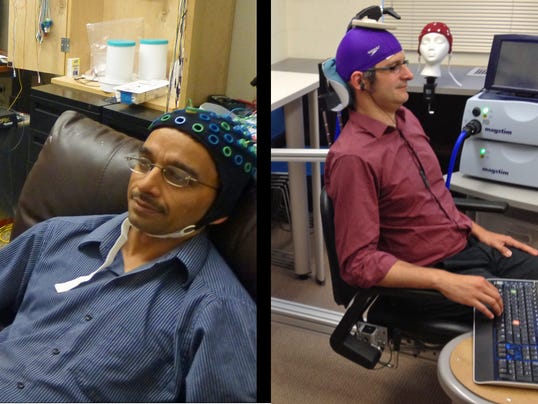
In the first demonstration of human brain-to-brain control, a scientist wearing an electrical brain-signal reading cap triggered motion in his colleague across campus.

On Aug. 12, University of Washington researcher Rajesh Rao sent the finger-flicking brain signal to his colleague, Andrea Stocco, in a first demonstration of human-to-human brain control, according to a university announcement.

This is freaky, and imagine someone involuntarily using your body like in Stargate Ra or Falling Skies Alien or in the Independence Day Alien?

Read more here.

Monday, August 12, 2013

Free WiFi calling (VoIP) app for your iOS, android phone US/Canada (No more spending your plan mintues)

* Google Voice is ending support for Talkatone. Please read my new post about alternative free WiFi calling apps

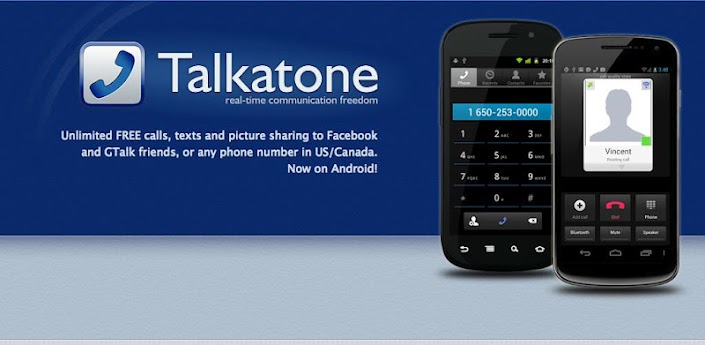
After using the free WiFi calling app "Talkatone" for more than 6 months, I'm pretty happy with the quality and its performance. Talkatone is truly a lifesaver with its free WiFi calling feature so that I don't have to use any of my minutes from the plan minutes.

I'm a happy camper and recommend to anybody who wants a free calling over your home, office or school WiFi. After I moved to AT&T $25 monthly prepaid package with 250 minutes, Talkatone saved me lots of my monthly minutes and I can't imagine how I can survive with only 250 minutes every month otherwise. I'm pretty much either at home WiFi or at Texas A&M WiFi all throughout the day, so why should I waste my minutes if I can use a calling using WiFi minutes? I was expecting the Google Voice or Rebtel are similar, but those are actually using your phone plan minutes. Another good thing is you can use your Google Voice phone number with the Talkatone because its service is based on the Google Voice.

If you want to know how to configure your android or iOS device to send/receive free calls through WiFi, please read my previous blog post, "Make free calls over wifi at US/Canada"

Hope this helps, and Enjoy!

If you like this post, please spread the word, use the options below to share this in your Facebook, Google Plus, Twitter or in blog.

Saturday, July 27, 2013

New Nexus 7 vs. Old Nexus 7


The search engine giant has officially unveiled its new flagship 7-inch tablet—a refreshed Nexus 7 with a new processor, sharper display and slightly heftier price tag.

Google has upped the price points to $229.99 for 16GB and $269.99 for 32GB, versus the $199.99 cost for the 16GB previous generation and $249.99 price tag for 32GB. The primary difference you’ll notice on the new Nexus 7 is its improved 1920 x 1200-pixel resolution display, which is a significant upgrade from the 1280 x 800 resolution on the former generation tablet.

Google has also opted for the year-old 1.5-GHz Qualcomm Snapdragon S4 Pro rather than an Nvidia chip like the 1.3GHz Tegra 3 found in the older Nexus 7. The newer ASUS-crafted tablet also comes with both rear and front facing cameras, unlike its predecessor which only featured a 1.3-megapixel front camera. The new tablet, however, comes with a 5-megapixel rear sensor and 1.2-megapixel front shooter. With 2GB of RAM, Google has also packed more memory than the 1GB of RAM found in the older model. And, of course, Google’s new tablet will be running the newest version of Android 4.3 Jelly Bean.

There’s not much of a difference in design, but Google promises that the new Nexus slate measures 0.3 inches thin and weighs 10.22 ounces—which is lighter than the 0.41-inch thin and 12-ounce older Nexus 7. For $30 more than the previous version, Google offers some minor enhancements to its affordable flagship 7-incher, but it could face stiff competition in that space with newcomers such as the ASUS MeMO Pad HD 7 arriving on the scene

Monday, March 18, 2013

Make free calls over wifi at US/Canada (without spending your plan mintues)

* Google Voice is ending support for Talkatone. Please read my new post about alternative free WiFi calling apps

I recently went out-of-contract from the AT&T 2 year commitment, so had to decide using Pay As You Go plan. I changed my number to AT&T $25 monthly plan which is only 250 minutes every month during your rate plan period. I find myself almost in 150 minutes after the first 7 days in the plan, so I guess things getting out-of-control with the plan. I seriously need some recovery method, otherwise I'm going to be out of all my plan minutes next couple of days before the 1 month pay go period.

Before I brought the monthly no contract plan, I thought I can use Google Voice using my smartphone (iPhone 3GS), but later I realized Google Voice is not a true VOIP (voice over IP) but a forwarding service where you end up using your plan minutes. So I was looking for a true VOIP service so that I can use my WIFI service to make calls. I'm pretty much at home or at school where I have a solid WIFI networks, so if there is a true free VOIP service, then I should be able to use my iPhone to make free calls over the WIFI network without using any plan minutes so that I can save the minutes to use when I'm not in a WIFI network (while on travel etc. )

I found "Talkatone" fits my requirements, which is a true VOIP service with free calls over WIFI networks for any mobile/landline phone in US/Canada. Here's how I configured the service to make free calls using my free WIFI networks without waisting my plan minutes.


Talkatone turns your iPhone, iPod Touch, iPad or Android into a true Internet phone. It uses any data connection, WiFi or 3G/4G. You’ll be able to have high-quality phone calls even when cell phone reception is spotty and won’t use up any of your minutes. Download Talkatone if you haven't yet and I'll show you the full power of your iOS or Android device.

Requirements.
1. Google Voice Account, if you don't have one, then create one. Google voice will give you a free phone number to choose from your area. This going to be your talkatone phone number, so choose wisely.
2. Talkatone app at your iOS/Android device.


Make calls over 3G or WiFi connection
Talkatone supports 3 types of calls:
- Facebook-based Talkatone-to-Talkatone calls,
- GTalk-based Talkatone-to-Talkatone or Talkatone-to-Mac/PC calls,
- Google Voice-based calls, i.e. calls to regular telephone numbers.

I'm going to talk about Google Voice-based calls to any regular telephone number. Google Voice calls are free to US and Canada destinations, to check international rates go to Google Voice International Rates. Data charges may still apply.

1. First, visit the Google Web Voice site at voice.google.com. Login to Google Voice using your Google credentials. If you are new to Google Voice you need to setup an account and get a phone number, check Getting Started Guide if needed.

2. To setup call forwarding click on Settings menu link and select Voice Settings option:

3. Make sure the 'Forwards to Google chat' option is checked on the Voice Setting web page. The email address in option should match email address you used to Sign In w/Google account when you launched Talkatone.
Your Google Voice phone number is right above forwarding options. You'll be using this phone number to make calls and will be receiving calls to this phone number in Talkatone.
Note: If you do not want your Google Voice calls being forwarded to your phone number uncheck forwarding to your phone number.

4. Open web browser and visit the Google Mail Web site at www.gmail.com. Login to GMail using your Google credentials.
Find your contact list and click on the Call Phone action at the lower left section of the page. Make one call the phone widget in GMail to your regular phone number.
To find the Call Phone option at Gmail, you need to have the Chat option enabled. Go to Settings, Chat and enable Chat On and then save changes. Now click on the chat which is on the left bottom of your mail labels to find the Call Phone option. Opera browser is not supporting the call widget. You probably need IE or Mozilla. Make sure to install the required Google Voice plugins before you make a call. Test whether your service is working. Google talk is a true VOIP service. Talkatone is using this service to make calls free.

5. This is important, now sign out or disable the Google Chat Service. Go to Settings, Chat and Chat Off then save changes. Otherwise, you want be receiving any calls and your calls will be forwarded to Google chat instead.

6. Come back to Talkatone and tap the keypad icon. Type any phone number within the US/Canada and tap on Call button to make a free call. Call will be placed using your 3G or WiFi connection

Upon selection of a calling option call will be placed using your 3G or WiFi connection. Destination, call duration and type of network will be displayed on top.
You can mute the call, switch to keypad, turn on speaker phone, share your current location, put call on hold or access your contacts list.
Note: Talkatone is not a replacement for your regular phone and cannot be used for emergency calling.

Receive Calls using your 3G or WiFi connection
Talkatone is able to receive calls instantaneously even when the app is not active. It uses backgrounding mode introduced in iOS 4, thus Talkatone is not compatible with certain older devices.

If you want to receive calls and text messages while keeping app in background you need to have a multitasking-capable device. Currently the following devices support multitasking - iPhone 3GS/4, iPod Touch 3gen/4gen, iPad.

Note: Talkatone does not work on iPhone 3G and iPod Touch 2gen.

Wednesday, March 06, 2013

Confirmed: Google Glass arrives in 2013, and under $1,500

“OK glass…”

Get ready to hear that a lot.

Google Glass is Google’s new video-recording, photo-taking, GPS, social networking, everything-a-smart-phone-does gadget. If you haven’t heard of it, it’s essentially a tiny computer device attached to a lens and mounted on a pair of wire glasses. It’s a next-generation technology — largely voice controlled, hands-free, super-innovative and a little like something out of science fiction: utter “OK glass…” followed by a command and you activate the device.

I wasn’t aware that Google’s R&D department has taken futuristic forays like this before, working on such things as self-driving cars, for example, but this new communications headset might really hit the big time, and soon. It hasn’t even been a month since the unveiling of the Explorer program, an aggressive beta initiative of the Google Glass project, but Google is already saying they hope to get their product out to consumers in the very near future. Steve Lee, Glass’s product director, told a reporter that he expects Google to deliver by the end of this year.

Ambitious deadline aside, there is one all-important question remaining: will this product actually take off?

Google’s platform on Glass sounds reasonable. Google hopes that Glass will be “technology that’s there for you all the time, but not.” In other words, you’ll be wearing your smart phone on your head 24/7, but you can activate it only when you need it, without having to fumble around in your pocket or look down at a screen — all it takes is a voice command, a movement of the head or a swipe of your finger (the side of the device is actually a touchscreen).

Everything you see — the menus, the weather, your mom’s texts — is projected on the lens right in a corner of your field of vision. Likewise, whatever you see, exactly as you see it, can be recorded by the device.

Capturing a moment will no longer require you to look through a middleman technology, like a camera or your phone. You can document your field of vision with one simple command, which is both neat and scary.

Obviously, one of the big issues Google Glass has to deal with in the public eye is its unsettling potential to eradicate privacy. After all, if people buy into this, everyone will be walking around with a camera strapped to their heads, able to record anyone else in just a wink. People already feel vulnerable to recording as it is because of smartphones, so how will they feel about Google Glass?

Eventually, they’ll get over it. This thing could change social norms; it could go the way of the early 2000s phenomenon where we wondered whether passersby muttering into their Bluetooth devices were crazy. Ultimately, I expect everyone will get used to Google Glass and that the elegance, innovation and “sci-fi” appeal of Glass will be too difficult to resist.

“OK glass, look cool.” This, by far, seems to be the command Google Glass will find hardest to obey. At the end of the day, as technologically awesome as Glass is, it still looks like a thick-rimmed pair of glasses with most of the parts missing — like glasses without the glasses, so that what you end up wearing is a wide metallic bar across your brow. With the lens hanging over part of one eye, Google Glass reminds me of the power-level readers from Dragonball Z (for those of you who grew up watching Toonami).

Such a look is bound to earn you some weird looks, at least if you’re going to be the first to own such an avant-garde piece of equipment.

Nevertheless, I think this is another hurdle that Google is going to overcome by the sheer force of the project’s other cool features. It could be the next big thing, and if not, at least it’s daring.

—Writer, Luben Raytchev is a junior from Marietta majoring in biology and English
Read the original article here.

Tuesday, March 05, 2013

Samsung’s next big smartphone, Galaxy S IV will have Eye Tracking

After all, my predictions for the technologies beyond 2010 is becoming a reality. Eye tracking is going to be the next big thing including the eye tracking capabilities in consumer products like Microsoft Kinect, Google Glass and now Samsung Galaxy S IV with eye tracking. If you don't know what is eye tracking, then try to fresh your mind with the movie "Minority Report" eye scan.


Eye tracking is a far superior technique than eye scan or retina scan, where it is the measuring either the point of gaze (where one is looking) or the motion of an eye (eye movements or saccades and fixations) relative to the head. So, with this technology, it is extremely unlikely to bypass a security system which require live eyes to detect the eye movements, pupil dilations and other factors which are related to unique specifics of a human. Wanna read more, check out my Biometrics using Eye Movements paper

Samsung’s next big smartphone, to be introduced this month, will have a strong focus on software. A person who has tried the phone, called the Galaxy S IV, described one feature as particularly new and exciting: Eye scrolling or eye tracking.

The phone will track a user’s eyes to determine where to scroll, said a Samsung employee who spoke on condition of anonymity. For example, when users read articles and their eyes reach the bottom of the page, the software will automatically scroll down to reveal the next paragraphs of text.

The source would not explain what technology was being used to track eye movements, nor did he say whether the feature would be demonstrated at the Galaxy S IV press conference, which will be held in New York on March 14. The Samsung employee said that over all, the software features of the new phone outweighed the importance of the hardware.

Indeed, Samsung in January filed for a trademark in Europe for the name “Eye Scroll” (No. 011510674). It filed for the “Samsung Eye Scroll” trademark in the United States in February, where it described the service as “Computer application software having a feature of sensing eye movements and scrolling displays of mobile devices, namely, mobile phones, smart-phones and tablet computers according to eye movements; digital cameras; mobile telephones; smart-phones; tablet computers.”

Samsung has also filed for the trademark “Eye Pause,” without describing what the feature does.

In an interview, Kevin Packingham, Samsung’s chief product officer, declined to share details about Samsung’s next phone. But he said he disagreed that the new hardware would be insignificant compared with the software, and over all, “It’s an amazing phone.”

Eye tracking systems have been in development for a while. Samsung’s current flagship phone, the Galaxy S III, already has a feature that watches you. The feature, Smart Stay, uses its front-facing camera to know to keep the screen lit up when a person is looking at it instead of dimming it automatically.

Tobii, a technology company that received $21 million in funding from Intel last year, has been working on a technique that uses infrared sensors to track precise eye movements.

Samsung’s Galaxy S III has been the company’s best-selling phone, so the release of its next flagship phone has been highly anticipated.

Saturday, March 02, 2013

YouTube’s ‘Do the Harlem Shake’ Easter Egg

Tired of looking through Harlem Shake videos on YouTube? Google is here again to keep things interesting and probably make you smile.

Remember, your browser should be Chrome or Mozilla. My Opera browser is not doing this Easter Egg.

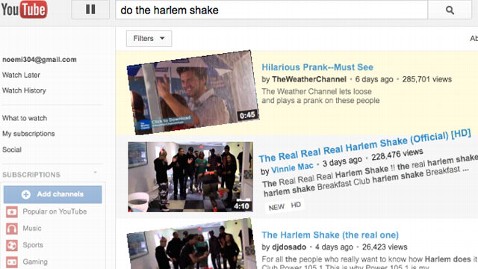
Type “Do the Harlem Shake” into a YouTube search query. What you’ll get is YouTube’s own rendition of the Harlem Shake — with thumping music, spinning panels, and the whole page shaking to the beat.

Or you can click this link "Do the Harlem Shake"

(Take couple of minute to try it. Then, please, come back.)

Google is no amateur at spicing up its sites with amusing so-called Easter Eggs. Who could forget “Do a Barrel Roll” or “Zerg Rush“? But with today’s YouTube Easter Egg, Google displays a more broad sense of humor, possibly appealing to folks beyond the geek mold. Unless you’ve been living under a rock for the past several weeks, you’ve probably heard of the Harlem Shake as the Billboard-topping phenomenon, or, as others might put it, that thing that happened after Gangnam Style.

Google promises to keep the Google Doodles and Easter Eggs coming.

Tuesday, February 19, 2013

Next Google Nexus 7 (2nd generation) is around the corner

There are technically no numbers to support this claim, but I think it’s safe to say that the Nexus 7 is easily the most popular Android tablet ever created. It matches the best of both worlds in hardware and software, plus it has that ridiculously awesome price tag that anyone could get happy about. When we start hearing news about the next iteration of this device from “upstream supply chains,” it’s time to get excited

Next generation (2nd generation) Nexus 7 rumored to pack full HD display, to be revealed at Google I/O in May 2013. Hold on to your money if you are in the market for a new tablet these days. The new Nexus 7 rumored to be a iPad mini killer. Thankfully, all those updates aren’t going to cost an arm and a leg, and in fact, the new Nexus 7 is expected to cost the same $199 and $249 for the 16GB and 32GB model, respectively.

According to a report by DigiTimes citing upstream supply chain sources, ASUS and Google are currently working to unveil the next generation Nexus 7 tablet packing a full HD display at the upcoming Google I/O 2013. The tablet is also alleged to boast a thinner display border (thinner bezel) giving it a fresher look.

While there is nothing wrong with Jelly Bean, I am hoping it comes running Key Lime Pie instead, since it’s already running Android 4.2.1, the latest version of the OS.

If you could have Google put in one additional feature to the Nexus 7, what would you want? Better display? Back-facing camera? Faster processor? More RAM? Anything else?

The one thing we can say is that if Google has plans to unveil a next-generation Nexus 7 — it will likely be at Google I/O which kicks off on May 15.

Update: Its funny that today (after this post) I ended up buying a used Nexus 7 8GB for a sweet $135 off Craigslist. The private seller wanted to get the 2nd generation Nexus so he just sold this for cheap.  I'm already a happy camper :)

Tuesday, December 04, 2012

iPhone Concepts: (iPhone 6 or iPhone x.x) or future mobile phone features

These are the round of features I want to see in a future iPhone or any mobile phone. I must say, most of these are conceptual and would make an iPhone something pretty darn interesting again. Not the same o same processor power, ram power, number of pixels, thinnest, biggest etc.
  • Holographic Siri
  • Transparent LCD
  • Projected laser keyboard with zoom in and out features
  • In-build projector
  • flexible OLED display to make iPhone wearable. Similar to Nokia 888 concept
  • Easily attachable to your car as the main display unit for speedometer, GPS, wifi enabled audio/video entertainment
  • Eye tracking biometric system
  • Language Translator
  • DSLR lens mount
  • Surround Display (there's no front or back, you can pretty much turn any side and phone can detect which side is facing you)
  • Surround sound with subwoofers
  • 3D display


Saturday, November 24, 2012

Best Laptop deal so far this holiday season (Black Friday)

Finally I got my self a deal I must say the best so far. I normally don't believe any of these black friday deals or Cyber Monday deals or Christmas deals. But I was looking for some laptops this holiday to replace my water damaged laptop and was looking for high-end ones with Ivy Bridge I7 processors. Most of these deals were in upper $700 limit and the max I was planning spend was around $650. There were always some systems I was tempted to buy because of their elegant designs like Lenovo U410 which was super thin and merely just $749 this black friday.

Please see my previous post about how to find good electronics deals and couple of my recommendations for an online sites which shows good deals with some descriptions.

While searching deals in dealnews.com , I so another tempting deal, HP Core i7 Quad 2.4GHz 16" Laptop w/ Win 8 for super awesome $599. I was kind a skeptical once, thought this was a Sandy Bridge processor (2nd generation) but later I figureout this was indeed an Intel Core i7-3630QM 2.4GHz Ivy Bridge quad-core processor with some cool specs. Here's the full specs for this.

5.7-lb. HP ENVY dv6t-7200 Quad Edition Intel Ivy Bridge Core i7 2.4GHz 16" LED-Backlit Laptop, model no. C0L27AV, for $899.99. Coupon code "HOLIDAY220HP" drops it to $679.99. With free shipping, that's $105 under our our mention from two weeks ago (which included a larger hard drive and better graphics) and the lowest total price we've seen for any HP Envy laptop with 8GB of RAM and Windows 8. Sales tax is added where applicable. Features include an Intel Core i7-3630QM 2.4GHz Ivy Bridge quad-core processor, 15.6" 1366x768 LED-backlit LCD, 8GB RAM, 750GB hard drive, DVD burner, 802.11n wireless, webcam, 6-cell battery, and Windows 8 64-bit.

The deals said, it was $599 but in the middle there was an update which says $679.99 at HP.com. I was perplexed. Again, I saw another note in the bottom said there was indeed an offer from Samsclub.com for members for $599. Woo hoo. I'm already a member at SamsClub.com and I was eligible for this offer.

Update: Of note, Sam's Club offers offers the HP ENVY dv6-7247cl Quad Edition Intel Ivy Bridge Core i7 2.4GHz 16" LED-Backlit Laptop, model no. C2L34UA#ABA, with the same specs as the above model for $599 with free shipping. Sales tax is added where applicable. Non-members pay a 10% fee.

 So, finally I have one of these cool HP Envy laptops with a Beats Audio; HP Triple Bass Reflex Subwoofer.  I'm super excited and waiting for the delivery end of this month.

If anybody else is waiting, there is a low-quantity stock still available live at SamsClub, click the following link to find the deal.

http://dealnews.com/HP-Core-i7-Quad-2.4-GHz-16-Laptop-w-Win-8-for-599-free-shipping-updated-/638080.html