"A meek endeavor to the triumph" by Sampath Jayarathna
Showing posts with label Computer. Show all posts

Monday, February 22, 2016

Next big thing in Computing? (Chris Dixon Article link included)


What’s Next in Computing?

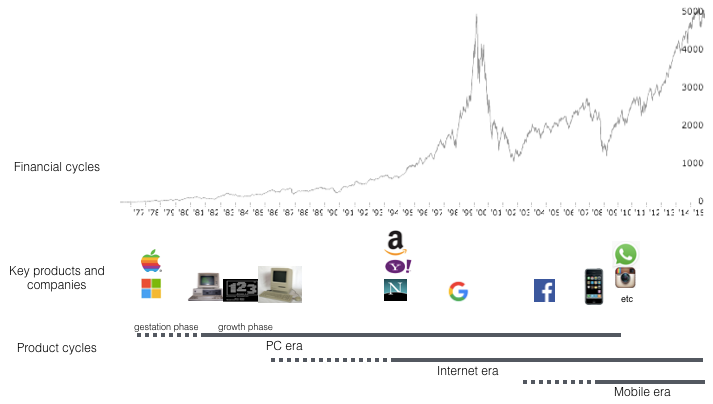
The computing industry progresses in two mostly independent cycles: financial and product cycles. There has been a lot of handwringing lately about where we are in the financial cycle. Financial markets get a lot of attention. They tend to fluctuate unpredictably and sometimes wildly. The product cycle by comparison gets relatively little attention, even though it is what actually drives the computing industry forward. We can try to understand and predict the product cycle by studying the past and extrapolating into the future.


Read the full article at the original post here

Friday, July 17, 2015

[tutorial] How to setup Virtual Host using WAMP

In order to run PHP on your local Windows computer, you need to install a server stack - either WAMP orXAMPP. Either will do, but for the purposes of this tutorial we're going to stick with WAMP.

If you have your php project in another directory, this tutorial will help you to setup virtual directory in WAMP to point to your php project directory. As an example, if you have your php project under eclipse directory, you need to enable virtual host in Apache configuration to run your code from the eclipse codebase.

Now, you could just do a basic install of WAMP and be on your way (using wamp\www to keep all your php files), but being restricted to just one directory in an obscure location on your computer is awfully limiting, especially if you're working on multiple projects at a time using other IDEs. That's where virtual hosts come in. By configuring virtual hosts on your WAMP server, you'll be able to run as many separate sites as you want, from any location you want.


This tutorial should work for machines running either Vista or Windows 7.


10 STEPS TO VIRTUAL HOST BLISS WITH WAMP


STEP 1

Download and install WAMP, then start the program. Pick a location on your computer where you want to set up your virtual hosts, like "C:/Users/Sampath/git/my-project". We're just going to work with one folder for now, but when we're finished you can set up virtual hosts in as many directories as you want.
As a sanity test, create a basic index.php file with some text ("Hello World!") and place it in the "My Site" folder. When we're finished, you'll know you've done it right when you can view your page in a browser using your virtual host's URL.

STEP 2

Go to "C:/Windows/System32/drivers/etc" and open the "hosts" file in Notepad. For Windows 7, open the properties and remove read-only option before you open it in Notepad. Also you can Right-click on Notepad and select "run as administrator". Then select File>Open and at the bottom right of the dialog box, select "All Files" from the dropdown instead of "Text Documents (*.txt)":


Then navigate to "C:/Windows/System32/drivers/etc" and open the "hosts" file.


STEP 3

At the bottom of the hosts file, below all the other text, add a new line with the following:

127.0.0.1        mysite.localhost               #My Test Site
:: 1

"mysite.localhost" is the domain name that will be used for your local site. You can name this whatever you want, like "johnnyfooball.tamu" or whatever. "#My Test Site" is simply a comment to help identify the site, which will be helpful once you start stacking up a lot of virtual hosts. Again, you can put whatever you want here, just don't forget the hashtag (#) beforehand, which is what makes it a comment.

Save the file.

STEP 4

Open "C:\wamp\bin\apache\apache2.4.9\conf" (your Apache version number may be different)

Just to mess with your head, there are 2 files - one called "httpd.conf", and one called "httpd.conf.build":

Open "httpd.conf".

STEP 5

At line 467, under "# Virtual hosts", un-comment (remove the hashtag [#]) before the line "Include conf/extra/httpd-vhosts.conf":


This tells Apache to include the file "httpd-vhosts.conf" (the file where we set our virtual hosts) when configuring its settings.

STEP 6

Go to "C:\wamp\bin\apache\apache2.4.9\conf\extra" and open the file "httpd.vhosts.conf". It should look like this:


STEP 7

We need to give Apache permission to look in our "Projects" folder for websites. Remove any dummy virtual host examples in the file. At the bottom of the page, below all the other text, add the following:

<VirtualHost *:80> 
            DocumentRoot "c:/wamp/www"
            ServerName localhost
            ServerAlias localhost
            ErrorLog "logs/localhost-error.log"
            CustomLog "logs/localhost-access.log" common 

            <Directory "c:/wamp/www">
                      AllowOverride All
                      Options Indexes FollowSymLinks
                      Require local 

            </Directory> 
</VirtualHost> 

<VirtualHost *:80> 
             DocumentRoot "C:/Users/Sampath/git/my-project" 
             ServerName   mysite.localhost
             <Directory C:/Users/Sampath/git/my-prject/>
                        AllowOverride All 

                        Options Indexes FollowSymLinks
                        Require local

             </Directory> 
</VirtualHost>


The DocumentRoot should be the path to the folder where your site lives, and the ServerName should match the domain you entered in your hosts file in Step 3.

Important: The DocumentRoot must be inside the directory that you gave Apache permission to access in Step 7. Also the "/" at the end of   <Directory C:/Users/Sampath/git/my-prject/>  is important. See the difference in DocumentRoot and Document. There is no "/" at the end of DocumentRoot.

Save the file.

STEP 8

Click on the green WAMP icon in your toolbar and select "Restart all Services", then wait for the icon to turn back to green.

STEP 9

Open your browser and navigate to "mysite.localhost", or whatever your domain name is. You should see the test page you created in Step 1. 

STEP 10*

*Optional. Enjoy. Run around and scream "Eureka!!!"

Thanks to https://www.kristengrote.com/blog/articles/how-to-set-up-virtual-hosts-using-wamp for the original version of this tutorial.  

Monday, December 30, 2013

MS Word : How to align Footnote Separator

1. Go to View from menu bar. Change the document views to "Draft"
2. Now go to References menu, in Footnotes, click "Show Notes"
3. From the drop down list, select Footnote Separator, and then use the Home menu to change the selected footnote separator to align any way you want.

Thursday, February 21, 2013

Enable EndNote in Microsoft word toolbar (EndNote X6 and Microsoft Word 2010 32bit)

If your EndNote menu is missing from Microsoft word toolbar, then here's how to enable it again.

Make sure your Microsoft word version is compatible with EndNote version. I have Microsoft word 2010 32 bit version and EndNote X6. Remember there is a problem with word 2010 64 bit which is not supported by EndNote. I'm not sure it is currently resolved or not but if thats the case this solution will not work.

You can check your word version by going to the File>Help where you can see the Office version.

Now here's how to enable the EndNote Add-Ins.

  1. Click "File" then click on "Options"
  2. Click "Add-Ins" from the list
  3. Select "COM Add-Ins" from the drop down list next to Manage at the bottom of this Add-Ins and then click "Go" button
  4. Now you can see the EndNote Add-In in the given list and make sure that Add-in is checked. 

Thursday, November 15, 2012

Best Electronics (tablets, notebooks, cameras) deals - how to find deals online?

I'm back in laptop hunting. My two year old son killed my 2007 HP Pavilion DV9700 laptop, he poured a coup full of water on top of it. So, yes I panicked and forgot good old tick of turning it off soon and keep it till the moisture is out, instead I kept on trying to switch it on and it actually came alive up until the windows boot screen logo to my joy! but yeah that was a short lived triumph, it straight went to sleep of dead.


So, I'm back online and lucky during the thanks giving Black Friday, Cyber Monday frenzy of tech deals. I personally don't believe that we actually get better deals during those long lines of cold night Black Friday door-busters, and not once I had some bad experience waiting to buy a better deal online without a single good deal, both Black Friday and Cyber Monday.


Personally I think the best time is when you really need one! Yeah right!

Here's what I'm looking for right now. My experience says I need to buy the top of the line processor and max possible RAM with possibly a bigger hard drive and Windows 8. Yes I want to keep my laptop/notebook at least couple of years so that I don't really get depressed after I see all these touch screen tech laptops coming with top of the line Ivy Bridge processors with windows 8.

Lenovo 437629U IdeaPad U310 Notebook Laptop (Google Affiliate Ad)

So, the big question, where should I check to buy one? Walmart? Oh crap, I will surely buy from Walmart one of those crappy laptops if I ever want to return and get my full refund. Smile and you know what I'm talking right?

Amazon? Again surely there are some deals, but not always.

I used to buy most of my laptops online, so that I can read the reviews, look at the Youtube channel to see some unboxing videos and couple of reviews from CNet and others and compare and contrast what I really get for most of my bucks.

Lately I found couple of good deals sites with some reliable laptop deals with swifts updates throought the day, so I can keep up with the deal and the summary of the technology specifications and a percentage of money I can save with that. In addition there's a cool feature which says what was the last know price of this brand across online or in stores and how much in reduced the price. Thats pretty cool Ha, up close and personal.

Apple MacBook Pro 2.9GHz Intel Core i7 Notebook Computer - MD102LL/A (Google Affiliate Ad)

I'm a big fan of deals2buy but they update once a day most of the time and sometimes I feel that some manifactures pay for them to display a particular deal top of the list to attract some buzz. But I found couple of more sites which actually updates pretty frequently during the day and give a sneak peak of what you really get from the deal.

Dell Inspiron 14z Laptop Intel Core i5-2450, 500GB, 14" - Red - Dell (Google Affiliate Ad)

So, here's my top 3 picks during this Thanks Giving, Black Friday , Cyber Monday and Christmas what not for deals loving fans, and hope you get what you really looking for.

www.techbargains.com - Here you will find press releases, recent media coverage and the latest information on tech trends and deals. Techbargains has been finding the best products and services at the lowest prices since 1999.

www.dealnews.com - where everyday is Black Friday. We bring you the best deals, coupons, and promotional offers from over 2, 000 online retailers every day.

www.deals2buy.com - has a plain simple look to its home page listing all the deals for the day paginated.

Saturday, November 10, 2012

if your internet connection gets disconnected frequently

Recently my Internet connection started getting disconnected every once in a while during the day. Every time I have to unplug the cable modem connection and plug it back which would eventually start the network connection. I thought its something to do with my ISP Suddenlink.

Netgear N600 Wireless DB Router WNDR3400-100NAS (Google Affiliate Ad)

But after some look around, I guess I found what is going on. My computer power management is setup to go to sleep mode in every couple of minutes and my cable modem power management setup is also setup to turn it off to save the power.

Motorola SB5101 DOCSIS 2.0 Cable Modem (Google Affiliate Ad)

Here's how to remove these power management setup.

In windows 7,
  • click on Control Panel > Hardware and Sound > Device Manager
  • Then expand the Network Adapters
  • Right click on your device (Cable Modem, Router etc.) and select properties. 
  • click on Power Managment tab
  • Remove the check mark from "Allow the computer to turn off this device to save power" option. 

Thursday, August 09, 2012

Suddenlink Monthly Usage Allowance (Data Cap) - FAQ

How can someone monitor usage or change my future notification options?

Most Suddenlink customers already have access to an online usage summary that is updated daily. If that summary is available in your area, it can be found by logging in to your online account at Suddenlink.net, choosing "My Account," and then choosing "My Internet Usage Summary." If you do not yet have an online account with suddenlink, visit Suddenlink.net; follow the registration instructions provided there; and then, when complete, choose "My Internet Usage Summary."  You need the pin and account number to create your online account. To view, click on My Suddenlink > My Account > My Internet Usage Summary. If you do not see a link to "My Internet Usage Summary," it means it is not yet introduced this resource in your area. Importantly, Suddenlink will not apply allowances to any Internet account until the online usage summary is available. Finally, where the usage summary is available and a monthly allowance has been established for residential Internet accounts, those customers can – after receiving their first overage notification – change their future notification options by visiting their Internet usage summary page.

Will un-used gigabytes roll over to the next month, like un-used cell phone minutes? 
Not at this time. Usage allowances are reset each month, for each billing period.

What happens if I'm one of the few who exceeds the monthly allowance?
After you are notified that a monthly allowance has been applied to your account, the following steps will be taken for the very few who go over their allowance:
After the first overage, the customer's Web browser will be directed to a Suddenlink notification page. The customer will be required to read that page, select how he or she wants to receive future notifications (by Web browser or email), enter the account number, and then save the information.
From that point forward, future notifications on this subject will be sent each time an account reaches 80% of its monthly allowance and again when it exceeds 100%. Those notifications will be delivered through the means selected on the first overage, unless customers change their notification preference by visiting their Internet usage summary page at Suddenlink.net.
Customer accounts will not be billed for exceeding their monthly allowance until the third overage. On the third and subsequent overages, the monthly allowance will be increased in installments of 50 GB at a cost of $10 per installment.

If the maximum advertised download speed is...
Less than 10 Mbps
150 GB  Cap

10 to 30 Mbps
250 GB  Cap

Greater than 30 Mbps
350 GB  Cap

Read mroe at : Frequently Asked Questions: Suddenlink Data Cap


Friday, August 03, 2012

How to stop email notification "You requested a new Facebook password"

Lately I was getting at least couple of these notifications "You requested a new Facebook password" and sometimes more than ten email notifications per day. Also I guess because I have couple of emails associated with my account, this each notification get forwarded to all of my email accounts.


I think this is another way of spamming these days, and you need to be cautious dealing with these and most probably these are some of newer ways to steal your account information or to take you to some phishing sites.

Facebook for Dummies By Abram, Carolyn/ Pearlman, Leah (Google Affiliate Ad)

I remember some of similar phishing attacks,
1. You get an email from (or similar to) your bank saying that you need to change your password for security  purposes. If you respond with your account details (most probably with the form given with email), somebody else is getting this or it will take you to a phishing site. Always remember to check the email address and the URL (whether the additional s like in https:\\ whether this is a secure transaction).
2. You get an email from someone who wants to transfer millions/billions of dollars worth of money or gold or some hidden treasure. If you initiate any discussion, they will ask you some money for initial processing or some paper work. Same thing with big lottery win notifications. Be cautious, no body going to give you a free money unless this is one of your own relatives :)

Mark Zuckerberg and Facebook By Hasday, Judy L. (Google Affiliate Ad)

OK, back to Facebook notification. What is this and should we do something about it? Again, be careful when you responding to even official emails from facebook. There may be a catch somewhere. This is just my opinion, but if you have some other information different from what I suspect here, please do reply.

The email notification is seems to originate from facebook and seems legit,

Hi Sampath,

You recently asked to reset your Facebook password. To complete your request, please follow this link:

https://www.facebook.com/recover.php?.........................

Alternately, you may go to https://www.facebook.com/recover.php and enter the following password reset code:

 xxxxxxx 
Please note: for your protection, this email has been sent to all the email addresses associated with your Facebook account.

*Didn't Request This Change?*
If you did not request a new password, let us know at:

https://www.facebook.com/login/recover/disavow_reset_email.php?........

Thanks,
The Facebook Team

OK, here's what I think what is this. Your facebook account associated emails and publicly visible, anybody can record one and try to modify your password. But for any password change to work, you need to click the given url or enter the password reset code at facebook. But what is the catch here, if you do one of above, you don't know the password but somebody else now knows both your user account login email and password. Now he owns your facebook account. Done deal!.

Facebook for Grown-Ups by Miller, Michael [Paperback] (Google Affiliate Ad)

If this is not what I'm suspecting, it may be a phishing email, and eventually take you to some bogus site. I don't want to click and check, so be my guest if you want to check and let me know :)

Now the real problem, you know that you didn't initiate the change of password or how to avoid getting these emails or avoid anybody trying to modify your password in the first place. Simple, just change your email visibility in facebook account. Here's how to do that.

If you have new facebook timeline, just click on your profile and then click "Update Info" right under your cover picture. Then goto Contact Details and click Edit. Now you can see all your email addresses and then the visibility options. Change each emails to "Only Me" or "Friends". I advice your to make it "Only Me", because even friends (you think) can trick you (may be your Ex-)  to take control your account.  Also remember to hid emails from your timeline. If your real friends want to contact you, then they should know how to find you, so no worries!

The Facebook Guide for People Over 50 By McFedries, Paul (Google Affiliate Ad)

Tuesday, December 13, 2011

Bootable USB thumb/pen/flash drive for a Vista and/or Windows 7 installation

Required:
  • USB Flash Drive (4GB+)
  • Microsoft OS Disk (Vista / Windows 7)
  • A computer running Vista / Windows 7
Step 1: Format the Drive
The steps here are to use the command line to format the disk properly using the diskpart utility. [Be warned: this will erase everything on your drive. Be careful.]
  1. Plug in your USB Flash Drive
  2. Open a command prompt as administrator (Right click on Start > All Programs > Accessories > Command Prompt and select “Run as administrator”
  3. Find the drive number of your USB Drive by typing the following into the Command Prompt window:
    diskpart
    list disk
    The number of your USB drive will listed. You’ll need this for the next step. I’ll assume that the USB flash drive is disk 1.
  4. Format the drive by typing the next instructions into the same window. Replace the number “1” with the number of your disk below.
    select disk 1
    clean
    create partition primary
    select partition 1
    active
    format fs=NTFS
    assign
    exit
    When that is done you’ll have a formatted USB flash drive ready to be made bootable.
Step 2: Make the Drive Bootable
Next we’ll use the bootsect utility that comes on the Vista or Windows 7 disk to make the flash drive bootable. In the same command window that you were using in Step 1:
  1. Insert your Windows Vista / 7 DVD into your drive.
  2. Change directory to the DVD’s boot directory where bootsect lives:
    cd d:\boot
  3. Use bootsect to set the USB as a bootable NTFS drive prepared for a Vista/7 image. I’m assuming that your USB flash drive has been labeled disk G:\ by the computer:
  4. bootsect /nt60 g:
You can now close the command prompt window, we’re done here.

Step 3: Copy the installation DVD to the USB drive
The easiest way is to use Windows explorer to copy all of the files on your DVD on to the formatted flash drive. After you’ve copied all of the files the disk you are ready to go.

Step 4: Set your BIOS to boot from USB
This is where you’re on your own since every computer is different. Most BIOS’s allow you to hit a key at boot and select a boot option.

Find the original article here.

Wednesday, December 07, 2011

How to enable flah player in Opera browser

After looking all around, finally figure it out myself and and still laughing at myself why I didn't looked at this in the first place.

Here you go,

If your Opera browser is giving an error message or warning and not playing youtube videos or any other flash based videos, and you've downloaded the flash player countless times and not any success, here's what you needed to do.

After installing flash player as the browser suggest, just go to Tools, Advanced, Plug-Ins and then scroll down to the place where Shockwave Flash is listed, make it enable. Thats all, if you are still laughing, I'm with you, TOTALLY :) and the fun part I'm a PhD CS major, and I had to run around several days and several uninstalls of Opera to figure this out :)

Sunday, July 20, 2008

Windows Vista – How to Organize Start Menu All Programs

My first PC with windows 98 was with very much messy All Programs menu. I remember who told me and showed me to make it organize and clean. Thanks to Charith Gunasekara(Pola), I learnt one such a good habit. Make it clean your Start Menu All Programs list. I did this easily with all previous Windows Operating systems, except Vista which took some learning cycle due to not looking at the exact place. Windows 98, 2000, XP resembles same way of locating the start menu programs by going in to Documents & Settings and selecting the particular user and then start creating folder list to make it organize whatever the way you pleased (Not sure that the correct location in Windows 98, b’se its way back sometime).
Vista is bit different to do the same task. I tried to locate it in the same way in C:\ drive, but couldn’t find it anywhere. I did some Googleing to find it but no success. Lots of people suggest locating it in C:\Users…… or some other locations, but I couldn’t find those places. Oh one thing mine is Windows Vista Home Premium (64bit OS) with Service Pack 1. After some learning curve, I found we can easily do this without going to details in C:\
OK. Here’s how to do this,

1. Click on Start Menu and then right click on the All programs
2. Now from the popup menu, click on “Open All Users”
3. This will Open the window for your start menu all programs
4. Now create whatever the folders you wish to be at your all programs list. I usually create folders for Office, Entertainment, Programming, Graphics, Utilities, Internet etc…This is as you wish
5. Now close the window and go back to the start menu all programs and now drag and drop appropriate programs into each folder in the list. This is little bit different in Vista, where you need to wait a second on top of the folder name to open the list, then only you can drop your item inside the folder itself.

Again thanks Charith for enlighten me on this organizing thing; it makes the Start menu experience so much easier.

Saturday, November 03, 2007

How to Install Ubuntu on Microsoft Virtual PC 2007 and resolve the Graphic Problem

When i checked my site traffic last few days, there was a considerable amount of requests related to "How to install Ubuntu on Microsoft Virtual PC 2007" or "Ubuntu Graphic problem on Microsoft Virtual PC 2007". I thought its better to guide my blog readers and show them a good resource place that they can learn all this with good graphical explanations (instead of repeating all and without violating the copy writes ha). Here is the link that you can use for step by step explanation on Ubuntu Installation on Microsoft Virtual PC 2007 and resolving the graphic problem.

Click here to view the step-by-step procedure

My advice here is, first finish your full installation on the Ubuntu on Microsoft Virtual PC and then start debugging on the graphic problem. For this you need to start your installation on text mood, not the graphic mood. You can use to following key combinations to start the text mood.

Clt+F4

One doubt that I had in the middle of the installation, where it asked to format the virtual hard disk. Don't worry this is not your hard disk C: partition. This is the virtual partition we selected way before the Ubuntu installation :)

If someone has any question on this, forward your request to my email
sampathid2003@yahoo.com No scamming please and also please use a proper heading for your email, otherwise those will end up at my junk folder. Happy hunting on the Microsoft Virtual PC 2007!

Wednesday, October 31, 2007

Oracle DBMS..............

These days I'm having fun with Oracle. Ye, its kind of cool stuff, feels like mysql that we used to expertise on our past undergrad database class taught by Amalka , I guess Dr. Amalka Pinidiyarachchi by now : ) We used to work with mysql, SQLServer, Access (better to say every bit of MS Access). Now time for Oracle.
Subject is CS 5332 Database Theory class. Two weeks ago we had our first lab quiz and u know how much I got out of 100? 95 and 5 Bonus points add up to 100 marks. Yee.... I was bit scared usually like old days, b'se I started work for it just 2 days before the exam and I tried to solve the example queries given on previous lab classes. I was shocked when I realized that I didnt know how to write at least some simple queries mentioned on the lab examples! So, I just phoned one of my friend to know whats up with these questions and then she mentioned that there was another note that I need to read before working on the queries. Actually that note was the major one that we needed to work on, stupid me. I realized that there was only 3 hrs for the quiz and thought that gonna mess with the quiz this time. There was one such query I couldn’t hold I tried my best to understand I couldn’t do so, then the only thing tried to cram and memorize it.
Before the quiz, Prof Anne Nug, our professor for the subject explained what expected from the lab quiz and showed us the problem before hand. When it was started I was really nervous and couldn't help my self to start the work almost 10 or 15 minutes. After a while I saw that Krishan Pramod, one of my Indian buddy, got answer for the first questions. Oh I was pretty nervous at that time. I couldn’t realize what the hell with my output. It was not in correct format. Then Krishan told me that I need to change the linesize parameter to 250. Here it comes first one down. Two more to go. Then, my cramming helped me out for other 2 questions. I finished entire exam within 2hrs with another 1 hr left. Both those questions from the one that I had problems and that I memorized how to tackle it. Hurrah for my instincts. There was 3 main questions and 1 bonus question. This is how I scored on them,
First question 35/40
Second question 30/30
Third question 30/30
Bonus question 5/10

Sunday, October 28, 2007

Ubuntu on Microsoft Virtual PC 2007

Last Thursday morning I spent alomst 5hrs on how to install Ubuntu on Microsoft Virtual PC 2007. One of Professor in Nims department asked my help to sort out problems he had on the preinstalled Ubuntu on MS VirtualPC in order to run it on Graphic mode. The graphic was trashy and couldn't see or execute anything on the graphic mode, though the text mode working pretty much. Started the work at Prof. Hahn's office around 7.30 am but was not successful till 11.30. I knew the problem was in emulated graphic hardware support on the virtual machine. It supports only 16 bit or less display color depth, which will leads to modify the display configuration manually. I found that if we can change the xorg.conf file, it would sort out everything. Problem was where to find it. Normally it should be in /etc/X11/xorg.conf but its possible to be at /target/etc/X11 or something like target/usr/lib/X11/xorg.conf
When I searched it on the web, I found several forums saying different locations for the xorg.conf location. Problem was I couldn't find it in any place. Started with fresh copy of the installation on MC virtual pc and started the text mode on the boot by pressing alt+clt+F1 combo. I was pretty much-fooled b'se it was in the middle of the installations, lots of packages specially graphics emulators not configured at that time. Silly me, I searched all around to find the file but no hit at all. Then I realized something wrong with the installations and continue the process again. It was almost 12 noon, I missed all my morning session at the international office. So I thought of taking the laptop back home and check it again at night.

When I started work again at night (that time the installation was pretty much done) and for my surprise I found the file at the default location /etc/X11/xorg.conf now the problem how to modify it to support only 16 bit. The file was read only and I didn't know how to make it modifiable on nano. GNU nano is a simple terminal-based text editor. Though not as powerful as Emacs or Vim, it is easy to learn and use. Nano is ideal for making small changes to existing configuration files or for writing short plain text files. Though its easy, had bit of problem on initial learing on how to work on it, specially how to exit from it :) we can see the commands on the editor but problem was on the representaion, its something like ^x for exit but how on earth I know this ^ means Clt key ha. Ok the orignal problem, how to open the file with wirte permission. I tried su and for my surprise I couldn't remember entered any super user for the system at the time of the installations, Mmm interesting ha. No super user on Ubuntu? Then I realiesed the use of sudo command. The actual command is like this,

sudo cp /etc/X11/xorg.conf /etc/X11/xorg.conf.backup

this line just to backup the config file incase of any problem, that kind of things can happen. Then I used actual command for modifying the file
sudo nano /etc/X11/xorg.conf

then by removing the line default '24' and change it to '16' hurrah here it comes Ubuntu on Virtual PC 2007.

May be I need to try installing Linux, Fedora & Ubuntu combo on my office PC too. Its kind of a cool stuff. But need to find some time.

Wednesday, August 22, 2007

Indiana Jones & the Infernal Machine PC Game - Oh I love to play again

A week ago I upgraded my laptop to 1GB RAM. Now its in super fast mode with 1.18GB of RAM (not like a super computer, but kind of a way that I feel it). Spent almost $60 for it, bit expensive ha. Not like at Sri Lanka. Guess what the firist feeling I got with the new RAM? To play my all time faivarite game Indiana Jones and the Infernal Machine. I played lots of games mostly third person games (better to say almost all games i played are 3rd person) b’se I hate to play games like Tiberian sun, Commandos, with small tiny characters and to handle 5 or 6 people at a time. But I can remember few of my friends who loved to play those, specially chamila (Virtusa) my old BIT friend. I don’t know from who I got that CD which included almost 500 arcade games plus Indiana Jones and the Infernal Machine. But I definetly remember how I lost it. I told about this game to Ranga (Virtusa) better know as Anangaya, one of my colleague at University pera, and gave the CD to him, then I forgot to ask to return. I still disapointed how careless I’m. That’s my faivarite game but I lost it. shame on me.As Sri Lankans we know all about the collections CDs and how expensive those are. Just kidding. We don’t even pay a cent to buy those, specially collctions CDs and games. We used to borrow those from friends install it, if its with CD supprot , then install the virtual CD option and play it. But here at the other side of the world , at US we have to spend money for everything. I checked the price of the game CD Indiana Jones , almost $5 dollars plus the shipping. will cost about $ 8. Its not a big deal to spend 8 bucks now but the problem is my comprehensive exam which is on next September 5th. May b later I can play the game.

I still can remember how much adicted to the game Indiana Jones. I spent almost 3 months to finish the game. In one level I spent 2 weeks to think how to solve that puzzle to move on. Two weeks!!!! Can you belive? Yep no joking. Even in sleep think about the puzzled place and how to track it down. Final levels of the games was so hard, so that I had to use some cheats to play it to end (If u wanna play the game and to feel how cool it is, dont use cheats, but I bet u cant move on, that much hard to play the latter levels). There are about 16 basic levels plus one bonus level. The game is like Max payne and Tomb Rider. With super cool graphics and lots of tools to use. But the coolest thing is the puzzls in each level. We have to think very deep to solve each to move on in additon to 4 super natural beasts in 4 main levels, Ice gurdian, Lava Gurdian, Quetzalocoatl and Robot Gurdian. But the fifth one the Marmaduk is the hardest of all. I saw the new game on the same character, Indiana Jones and the Empere’s Tomb, you guys and gals know where it start playing, Waariyapola, Sri Lanka!!! Amaziing isnt it. But couldn’t play that game due to the vedio card limitations. It needs the ligtning and rendering and high memory VGA card. Like Gforce 4 or 8. Graphics is awsome. But the game control is little bit odd. I certainly wanna play it but latter , may be when I buy a desktop with a high performance.

Wanna walkthrough my game? Here it is. Bet u wanna play this game.

Indiana Jones and the Infernal Machine – Walkthrough

While working in the canyons of Utah in 1947, Dr. Jones is visited by his old girlfriend Sophia Hapgood, who now works for the CIA. She tells Indy that the Russian Communists are excavating the ruins of Babylon looking for something. She asks Indy to take the assignment which is to find what the Soviets are looking for. Jones takes it.

When he arrived in Babylon, Jones overhears a conversation between a Russian radio operator and Dr. Gennadi Volodnikov, a physicist. Volodnikov says he's looking for clues about a machine buried in the Babylonian ruins that was used for communicating with Marduk, the Babylonian god. Jones then slips away and infiltrates the Russian dig site. He then goes into a ruined building where he finds a locked door. He goes back and is confronted by a Russian soldier. Before the guard can shoot, he is shot from behind by Simon Turner, Sophia's boss in the CIA. Turner gives Jones the key to the door and opens it, finding ammunition and oil barrels. He shoots the barrels, creating a massive explosion, and sees a gaping hole made from the blast. Jones then drops down and finds an elevator. Going deeper into the palace, Jones finds Nebuchadnezzar's Library. In there, he finds three cuneiform tablets. When he puts them together Jones reads, "Make welcome seeker, know that it was Nebuchadnezzar, in heed of the writing that Marduk, made appear unto him, who builded the Great Engine. Having no understanding, the rabble hath thrown down is work, but four trusted disciples are scattered all over the earth and the relics go with them. Wouldst thou tread the path of knowledge, look eastward. Urgon, it is, who flees to the heavenly mountains, where Shambala holds a mighty secret." Jones finds a map leading to the heavenly mountains, which is the Tian Shan Mountain Range in Kazakhstan. Indy leaves the room but finds an idol of Marduk that Turner requested he find for him. Indy sees Turner at the area where he started this level and gives him the idol. After telling Turner everything, Jones gets in his jeep and drives off, remembering Turner's warning that Kazakhstan is in Soviet territory.

After parachuting out of a plane, Jones travels through the snowy mountains and comes across a Soviet border post. He enters it, after shooting up all the guards, and finds a raft. He inflates it and navigates the treacherous rivers, where he then finds a strange candle holder. On the other side of the river, Jones sees a large monastery he believes is Shambala. But the bridge is not open for use. Believing he needs to find candles for the holder, Jones again navigates the rivers and locates them. He brings them back, sets them on the candle holder, and lights them up. A gust of wind activates the windmill on the other side, and the bridge swings across for Indy. He then crosses the bridge and enters Shambala Sanctuary.

Expecting to find monks roaming the halls, Jones finds the monastery abandoned. Instead the place is inhabited with little ice minions who attack him. As he fends them off, Jones sees a bell in the bell tower and a small statue that's supposed to ring the bell. He uses it to ring the bell and an old woman appears before him. She says she is the temple's caretaker and asks Indy to "search for a golden treasure". Indy goes off and explores the temple. He finds a little flower which he later puts in water and douses it in sunlight. Afterwards it now sprouts a little bud. He returns to the woman and gives her the flower. It fully blossoms and the woman is now young and strong. She then opens a door that leads inside the mountain next to the temple. Indy enters the doors, slides down a tunnel, and ends up in a large chamber. Landing in front of him is a gigantic ice monster which roars menacingly at him. As Jones evades the beast, he runs into a smaller room that houses a strange mechanical device; Urgon's Part of the Infernal Machine. The device is used to smash open weakened walls by emitting a small concussion wave. As Indy leaves the room, he's cornered by the ice monster. Jones activates Urgon's Part which hurts the beast. Jones activates two more times in the monster's face and it explodes in a shower of icicles. Jones walks outside the temple and sees the holy woman. She thanks him for his efforts and guides him through a secret passage way to the jungles of Palawan Island in the Philippines.

Jones, now in a beach and jungle environment, comes across a volcano which is active. He enters it through a door and after navigating some passageways, Jones is greeted by Sophia. She is then captured by the Russians, causing Jones to later rescue her and shoot up some more Russians. After freeing her, Indy is assisted by Sophia through a door but she leaves him saying she has more spy work to do. Jones goes off and comes across a small gondola which takes him to the lower levels. Down there, Jones sees large rock creatures that ruthlessly attack him. As he dodges them, Jones comes across a lava lake which is inhabited by a large creature made of lava. Indy evades the monster and finds Taklit's Part of the Infernal Machine. This device makes him invisible. He uses it to sneak past the lava monster and goes outside where Jones finds a lake of water. He pushes a button and a statue head opens its mouth draining the water. Inside the cave, another statue head open its mouth and the water pours through, cooling and hardening the lava. The lava monster is then cooled and hardened as well. Now completely free to walk on the lava, Jones exits the cave. Outside he finds a campsite where he expected Sophia and Turner to meet him. Wrong! Jones is ambushed by the Russians and he escapes them on his jeep. After navigating the maze-like passageways of Palawan, Jones sees Sophia and her helicopter. Jones gets on the chopper and he and Sophia leave the island for Mexico.

Indy enters the Pyramid of the Sun in Teotihuacan, Mexico. It's dark inside the pyramid so Jones opens some doors that bring in the light, which later bounces off a statue holding a mirror, and opens a large door. Jones enters it and comes across a hidden valley once inhabited by the Olmec civilization. As he navigates it, Jones finds a large pyramid and enters it. The chamber he's later in had two large doors on both sides of the room. Jones opens one and finds it empty save for a pressurized platform. He steps on it and then goes to the second door. When he opens it, he sees a large feathered snake named Quetzalcoatl. Behind it is Azerim's Part, just a bit too high for Indy to get. But the pressurized plate Indy stepped on raised a platform for Indy to step on and get the part. As he evades the snake, Jones gets the part which makes him levitate when he stands under crystals called The Jewels of Heaven. Jones levitates himself onto an overhead walkway and is safe from the snake. On the ends of the walkway, Jones sees elevator platforms that not only lower him back down, but raise up spikes from some pitholes. Using this to his advantage, Jones has the spikes impale Quetzalcoatl several times before the snake explodes. As Jones leaves the pyramid, he is ensnared in a rope trap set up by Gennadi Volodnikov.

Onboard the Russian freighter, the V.I. Pudovkin, Jones is a prisoner. He escapes his room, finds his stuff, and finds the three machine parts. He then gets off the freighter by using a small motor boat and speeds off to the African coast. Then, probably by private plane, Jones arrives at Meroe, Sudan. He explores several of the pyramids there and finds a passageway into a mine shaft. Hitching a ride on a minecart, Jones navigates the mine caverns and finds three jewels believed to be owned by King Solomon. Using them to open another passageway, Jones enters the tomb of King Nub, one of the disciples of Marduk. After exploring some areas and running into several robots that attack him, Jones finds Nub's Part, a battery that powers up machinery. After defeating a large robot of Nub's creation, Jones exits the tomb and finds Sophia and Turner waiting for him. Turner demands he give them the machine parts but Volodnikov appears behind Indy, saying the agents are gangsters. Indy, however, gives them the parts and they leave him behind. Volodnikov says their betrayal will cost them their lives but Jones follows them.

Back at Babylon, Jones discovers the Infernal Machine. He sees Turner and Sophia put Taklit's Part in a socket and activate some levers. A crystalline cage drops down in front of them and Turner orders Sophia to enter it and go to the Aetherium, where Marduk lives. Sophia refuses and Turner pushes her in anyway. He sees Jones and says he will use the machine to destroy the Communists and secure the world for the Western Powers. Jones doesn't like the idea but Turner disappears with Taklit's Part. Jones discovers that Turner has stuck the machine parts, except Taklit's, in the wrong places. As he searches for Turner, he puts the parts in the right places. Afterwards, Jones faces Turner in a gun showdown and wins. He takes Taklit's Part and installs it. Sophia then drops down into the portal and Jones dives in after her.

Jones ends up in the Aetherium, a world filled with machinery. In this place he finds the Tool From the Beyond. This device opens portals back to Earth (usually places Jones has been before in his adventure) so Jones can replenish his health. Afterwards, Jones faces Marduk but can't defeat him easily. He rushes through a portal that leads him back to the Pyramid of the Sun and gets the mirror from the statue. Rushing back to face Marduk, Indy used the mirror to bounce back Marduk's electric balls back at Marduk, causing him to flee and drop his medallion. Indy inserts the medallion into a socket and an electric ball drops down. Indy then charges his whip with it (which is why Indy's whip is electric in his picture) and goes off to free Sophia. He succeeds in doing so but Marduk swoops in and merges his body with Sophia, creating Mophia, a large harpy-like creature with Sophia's face. As Jones evades Mophia, he finds portals linking him to the mine shaft in Meroe and retrieves King Solomon's jewels. Returning, Jones uses the jewels to unlock three doors that have portals leading to Babylon behind them. Jones opens these portals causing a leak between realms and weakening Mophia. Jones later attacks Mophia with his electrified whip and Marduk is destroyed, releasing Sophia. The two share a romantic moment that is interrupted when the Aetherium begins to collapse. Sophia and Indy run through the portal back to Babylon and the Aetherium vanishes behind them. Volodnikov confronts the two but admits that it was wrong to have tried and used the Machine for world domination and becomes friends with Indy and Sophia. The three then walk away into the sunset.
Also, for fun, if players accumulate enough money by finding treasures, they can buy a map that leads to a secret level, The secret level is in Peru, South America. This is the place Indy went to at the start of Raiders of the Lost Ark. There, he goes to the same temple and finds new passageways and finds another idol. He gets it and escapes another boulder, glad that Belloq won't get this idol.


Characters
Indiana Jones
He holds an advanced degree, speaks and reads a dozen languages, has an encyclopedic knowledge of the past, and teaches school. Yet Indy is anything but a mild-mannered professor. He’s been everywhere, seen everything, and when he gets into trouble he knows how to get out–using his wits, his fists, his whip, a gun–whatever it takes. His boundless appetite for treasure and adventure stems from an abiding faith in the mysteries of life.

Sophia Hapgood
Indy has crossed paths with this resourceful and independent woman before. They worked a dig site in Iceland together, where she found a medallion that awakened her psychic powers. Later she helped him find Atlantis. Then, after a tumultuous romance, she disappeared. Now she's back, a spy for the newly formed Central Intelligence Agency, recruiting Jones to figure out why the Soviets are digging up Babylon.

Dr. Gennadi Volodnikov
Analytical by training, mystical by nature, this near-sighted Soviet genius spent the war years designing top secret military codes. Now he's busy investigating the ruins of Babylon, convinced that the Tower of Babel once housed a power more terrifying than America's atomic bomb. Volodnikov is an unlikely archaeologist, more at home with tea and piroshki than fieldwork. He's not much of a Party man either, but the force of his intellect keeps the Communist ideologues at bay.

Simon Turner
Sophia's boss. He's a military intelligence officer who parachuted into France to help organize the Resistance during World War II. When President Truman established the CIA, Turner was one of the first to join. He's cool and competent, always near the action, rarely in it. He hates the Communists, because no one gets rich in their system. Where would America be without men like him?

Nubian Boy
An agile young boy living among the pyramids of the Sudan. Educated in a British missionary school, he's fascinated by European technology–and scared to death of hyenas. He wears a blue diaper.

Holy Woman
The last resident and apparent caretaker of an ancient sanctuary in the high mountains of Soviet Kazakstan. Her withered frame and abrupt manner conceal a radiant energy Indy must learn to release.

Marduk
Babylonians worshipped him as a god, but he’s actually the power-hungry ruler of a strange domain called the Aetherium. If the mechanical gateway he designed to connect his world with ours had ever worked—woe befall mankind!

Levels
Canyonlands
This is where you learn to be Indiana Jones. The location is in the canyons of Utah. it is here where he gets his assignment by Sophia who dropped by to visit.

Babylon
Jones arrives in the ruins of Babylon where he sees a Russian dig site. He infiltrates it and is met by Simon Turner, Sophia's boss in the CIA. Jones later finds three cuneiform tablets telling him where his first destination is and an idol of Marduk which he gives to Turner.

The Tian Shan River
Jones has to navigate the perilous rivers of snowy Kazakhstan in order to find four candles that'll permit him to enter the monastery. Opposing him are the Russian border guards and some wolves.

Shambala Sanctuary
Jones has to navigate the monastery and activate the machinery so he can explore more of the building. The Russians follow him in but are defeated afterwards. Jones later encounters devilish ice-minions, a holy woman who helps him in some areas, and the ice monster that guards Urgon's Part. After acquiring the part, Jones uses it to destroy the beast and get Urgon's part and is guided where to go next by the holy woman.

Palawan Lagoon
Jones makes it to Palawan Island in the Philippines well ahead of the Russians since they don't appear in this level. He later finds a useful machete to hack the vines, a half-sunken Japanese freighter, and underwater passageways that'll permit him to enter the local volcano.

Palawan Volcano
Jones carefully makes his way through the lava tunnels of the volcano and eventually meets Sophia. She's later captured by the Russians but is eventually freed by Indy. She helps Jones get through a door but abandons him in order to do some spying. She warns Jones of another danger ahead and the archaeologist makes his way to the volcano's lower levels.

Palawan Temple
Jones enters a wrecked temple deep in the volcano and is confronted by slow-moving stone creatures. They're easily destroyed by Urgon's Part and the archaeologist continues onward. He moves outside briefly and after careful navigation of rotting rope bridges, he makes it to a lava filled chamber inhabited by the guardian of Taklit's Part, a large lava creature. Dodging it's attacks, Jones makes it to Taklit's Part and uses its invisibility power to sneak past the monster and freeze it to death with water. (level will not work on xp unless switching propteries and switch from xp to 2000 of 98

Jeep Trek
(switch to disc 2) Even though Indy didn't see the Soviets back at the temple, they greeted his arrival when he walked out. He then escapes them with a jeep and is picked up by Sophia flying a helicopter. This level enables you to run over Russians and do long jumps over broken bridges.

Teotihuacan
Indy lands in the ancient, multi-story Pyramid of Sun. The goal of this level is to put up a mirror in the hands of the central statue. When all the upper floors are enlightened it will reflect the light and open a massive door to the next level. To do this you must move around rock gears in order to open four doors. Behind the Jaguar, Fish, and Bird doors there are a few easy puzzles to get to an idol. Behind the fourth door there are places to put the idols. Beware, once you get to the idol behind the Fish door, the Russians will move in to engage you.

Olmec Valley
This level features a large valley once inhabited by the Olmec tribes. Several regions of the valley are connected with three bridges. To activate the bridges Indy must position the corresponding Olmec Stone Heads onto the proper pressure platforms. The goal of this level is to reach the pyramid at the end of the valley. Indy meets a giant snake Quetzalcoatl inside there, much to his displeasure. He acquires Azerim's Part which enables him to levitate if he stands underneath blue crystals called "The Jewels of Heaven". After destroying the large snake with spikes, Jones is captured by the Russians and finally meets Dr. Volodnikov.

V. I. Pudovkin
Indy escapes his confinement onboard the Russian freighter, V.I. Pudovkin. He later gets his whip, revolver, and all three machine parts. Before he leaves, he overhears Volodnikov talking about Meroe with the ship's captain. Knowing that's where the last machine part is, Jones gets on a motorboat and speeds off ahead of the ship.

Meroẽ
This level features four ancient pyramids of Nubian kings. Inside each pyramid there is a Lens Room. Indy must turn on all four lenses to open the door to the next level. The light beams from the lenses will show the exact locations of the four one-eyed statues, which require an Eye Crystal to open each of the four hand-type locks on the exit door. In this level Indy meets a Nubian boy, who helps him to get this Crystal, ravenous heyenas, and a squad of Russian troops. (Level has malfunction on 2000)

King Sol's Mines
The goal of this level is to gather Three King Sol's Gems, Eye of Horus and install them in a small pyramid. The pyramid is on top of an elevator which will permit him to enter Nub's Tomb. During this quest, Jones causes a minecart with Russians to fall off into a pit.

Nub's Tomb
This level features large underground chambers with pillars and hidden passages. Indy's goal is to claim the final Infernal Machine's part – Nub's part, which accumulates some electric power and allows Indy to use different electric devices. The part is protected by an energy shooting Electro-Ball and the many rooms are inhabited by robotic machines that attack Indy. He enters the crypt of Nub and accidentally releases a vast robotic guardian who attacks him. Jones activates several electronic plates that the robot steps on, eventually short-circuiting until it's deactivated. After he gets outside, Jones faces a difficult choice: give the machine parts to Sophia and Turner or to Volodnikov.

Infernal Machine
The beginning of the level brings you back to the map room in the Babylonian library, but the map is torn off, revealing a door to the machine. Jones comes across the awesome Infernal Machine and sees Turner and Sophia install Taklit's Part. Turner then ruthlessly shoves Sophia into a crystalline cage so she can be a "diplomat" to the other side. Turner tells Jones that he plans to use the machine to destroy the Communists and make the world safe for democracy... and capitalism. Turner then takes Taklit's Part out and becomes invisible. Jones searches for him and puts the other machine parts in their rightful places since Turner installed them incorrectly. After a heated gun battle, Jones kills Turner and gets Taklit's Part. He installs it and tries to free Sophia but Marduk satute comes out and sends them both fall into the Aetherium.

The Aetherium
In this envisioning, the Aetherium was another plane of existence, ruled by the god Marduk, which was composed primarily of bluish mists, alien machinery, glowing lights, extraplanar creatures, and other such oddities, and was almost entirely insubstantial to the protagonist, Dr. Jones, who entered it near the end of the game. Sophia is still stuck in the glowing ball while Jones has a survival bar, similar to the ones for breath or Boat, and if it runs out, will constantly sustain damage to his health as a direct result of being outside his usual plane. It's impossible for Jones to walk through the mist, but instead allows Indy to "swim" through".
This level is something completely different from the usual Indy-like style. Indy is inside some "multi-dimensional" substance, which allows him to access different places from the levels he has already been to in reality through special portals. To activate a portal he needs a Tool from Beyond. Here he also meets two incarnations of Marduk and he must kill him by whipping electric blasts. Indy needs to find Three King Sol's Crystals and open three portals to Babylon. The result of this is collapse of Aetherium. Indiana has to escape through the opened portal. At the end Indy climbs out and shakes hands with Sophia and... Volodnikov, who turns to be a nice guy appreciating a true archeologist in Indy and offering rivers of vodka to celebrate the happy ending of the level.

Bonus Level - Return to Peru
This little bonus mission is either possible to get to by purchasing the map, by completing the game, or by gaining a certain amount of treasures.
This level brings Indy back to the Temple seen during the beginning of Indiana Jones and the Raiders of the Lost Ark, but coming through another entrance (Since a certain boulder is stopping you). Indy must work his way through the old traps ("Stay out of the light", the ravine, etc.), new traps (Falling platforms, spikes, etc.) and dangerous animals, including a jaguar, piranhas, and snakes. After retrieving a familiar-looking idol, another boulder rolls after Indy, but goes 'up'. But we all know the rules. What goes up, must come down. The boulder returns, and once again Indy must use his running skills to get out of danger.
After the boulder drops, return to the crypt room, and continue the same route you used; since the boulder is no longer there, you should see a brown circular plate instead. Jump to it, then make your way through the narrow hole on the right. There are five square buttons on the wall in this room. Pressing each button gives you a unique musical tone. Press them in a certain order, corresponding with a prominent five note musical sequence from another famous Steven Spielberg film. This opens another door, showing a familiar structure; you also receive a nice bonus of some herbs and trauma kits.

Machine Parts
When the Tower of Babel was destroyed, Marduk's disciples fled to different parts of the world carrying four critical parts of the Infernal Machine with them. Each part has its own power, and can in certain cases be used as weapon. Indy can only endure using parts for short periods without demage. Only when all four machine parts are returned can the Infernal Machine operate again.
Urgon's Part (Q Key)
Found in the snows of Kazakstan. When used by Indy, it sends out vibrations, and capable of destroying weak walls (will not work on level 7 on xp)

Taklit's Part (W Key)
Found in a volcano in the Philippines. When used by Indy, it confers invisibility.
Azerim's Part (E Key)
Found among the artifacts of the mysterious Olmec civilization of Mexico. When used by Indy with strange crystals called the Jewels of Heaven, it causes levitation.
Nub's Part (R Key)
Found in a tomb in the Sudan. When used by Indy, it powerfully energizes certain machinery of unearthly origin.
Tool From Beyond (T Key)
Opens permeable membranes separating the Aetherium from our own world when Indy is on the other side. It resembles a machine part.
Bosses
Each of the machine parts has a supernatural guardian or monster, keeping it safe from intruders, which unfortunately includes Indiana Jones, as well.

Ice Guardian
This enormous icy ogre in the Shambala Sanctuary guards Urgon's Part with the aid of little ice minions. Moving quickly will save you health and do not try to kill the ice monster with regular weapons. He is defeated with Urgon's Part.

Lava Guardian
The corporeal lava deity of Palawan Temple lives in a fiery lake and guards Taklit's Part with the help of lava warriors. The lava warriors are slow moving, but the Lava Guardian is not - so be quick. The Guardian is defeated by running across the bridge and opening a cave allowing water into the lava lake. This solidifies a portion of the lake, including the Lava Guardian.

Quetzalcoatl
Deep within the Olmec Valley, the ancient god, Quetzalcoatl, has become embodied in a giant feathered snake who fires smaller snakes from its tongue. The colosssal serpent guards Azerim's Part. Hint - open the door that the giant snake statue is not facing first. The pressure switch is timed. The snake can't attack you if you can't be seen.

Robot Guardian
Within Nub's surprisingly electrical, mechanical Egyptian Tomb, a giant bronze robot is the sentinel over Nub's Part.

Marduk
Ethereal Marduk
In the Aetherium, Indy first encounters (and must avoid) its ruler, the Babylonian god Marduk. Without any weapons to fight Marduk in his pure energy body, Indy cannot defeat him. However, Indy acquires a mirror to reflect Marduk's ether blasts back at him, to weaken him, and eventually, force him to flee temporarily. Final Marduk
After some further exploration of the Aetherium, Indy is able to electrify his whip, which will prove useful in battling Marduk who possesses Sofia's body, creating a majestic, female, birdlike nemesis.

Minions
Along the way, Indy also encounters all different members of an army of Communist soldiers, predatory wildlife, and lethal creatures like spiders, sharks, and jaguars. However, each "boss level" is chock-full with an additional amount of particular devious minions that go along with each boss:

Ice Demons
Small, otherworldly monsters found inside Shambala's walls that travel around by rolling and fire icicles at their victims. They resembles miniature versions of the ice guardian.Lava Warriors
Humanoid monsters made completely out of molten rock and come to life when approached, dwelling within Palawan Volcano. They move slowly, clubbing and smashing their prey, and can only be defeated using Urgon's Part.
Venomous Snakes
Seemingly ordinary serpents that inhabit the Olmec Valley, but that are unusually great in number and have the telltale red band markings. They're poisonous, but aren't too hard to kill.
Robotic Minions
Apparently, long ago, the Egyptians had secretly found a way to harness electrical power and develop the world's first mechanized robots. Alas, they're not friendly robots, but basically self-propelled killing machines. The robots in King Nub's Tomb come in all shapes and sizes and can be destroyed with most of Indy's usual firearms, but cause a rather large explosion when they are killed.
Aethereal Demons


A diverse variety of apparently Aetherium-inhabiting organisms have come into being. They range from plump, spiked insectoid creatures (poisonous) to what appear to be large reptilian fetuses with wings (which are harmless). Nevertheless, stear clear, and always be prepared when about to turn a dark corner.
Wednesday, June 27, 2007

Microsoft Surface - New Era of Computing

I heard buzz about this Microsoft Surface computing for several days, but by chance found the Microsoft link for the Surface-computing web. I guess this is the change what we expect from the computing world; there are lots of hopes about new computers made up of neurons for fast response or use of optical technology for hasty data transfer. At least we have something new to try out soon. Surface computing!!! I’m wondering how it feels. When I first saw the new Apple iPhone which is going to be released on June 29th, there is a fundamental similarity between Microsoft Surface and Apple iPhone. Both of them actually trying to provide real time feeling actually touch , not touch of a button. Its like computers and techs we saw in Sci-Fi’s. New Era of technology.

Wanna know more about the Microsoft Surface.......

Microsoft Surface represents a fundamental change in the way we interact with digital content. With Surface, we can actually grab data with our hands, and move information between objects with natural gestures and touch. Surface features a 30-inch tabletop display whose unique abilities allow for several people to work independently or simultaneously. All without using a mouse or a keyboard.

While the first Microsoft Surface units won’t hit the market until winter 2007, over the coming months you’ll have opportunity to get hands on with surface at a host of events.

SIGGRAPH Conference, San Diego, CA August 5-9, 2007.

Read more?
http://www.microsoft.com/surface/

Monday, December 12, 2005

First RMI Application....

What a start for the day. I just finished my first RMI Application. I love this Java thing. If I look several months back, hated on programming. Now things getting better and better. Going to be some fun with Java. Going to love this thing (hey don’t worry nim ur place is secured….). Still to do some work on CORBA. Have to find a research paper on this CORBA Trader System for my Seminar presentation. I don’t know where to start. We’ll see.,……….