This forum post gives you most of available links for this game between Texas A&M University Aggies and University of Alabama Crimson Tide this September 14, 2013.
http://forum.wiziwig.eu/threads/85237-2013-NCAA-Football-Week-3-Streaming-amp-Discussion
I checked it last time during the TAMU vs Sam Houston game, the links were crystal clear, no ads and relatively fast. So, I hope things will be same for this big game between SEC giants.
Friday, September 13, 2013
Texas A&M VS Alabama , College Football (American) Game of the Year September 14 2013
We #Aggies are the #Moon and control the #tide of #NickSaban #Alabama this Saturday noon. #JohnnyManziel = #JohnnyMoonziel
— Sampath Jayarathna (@OpenMaze) September 13, 2013
Well played #KevinSumlin hiding part of his defensive unit from #NickSaban #Bama never know what hit them this Saturday at #kylefield
— Sampath Jayarathna (@OpenMaze) September 8, 2013
Tuesday, September 03, 2013
Johnny Manziel Haters first read this!
If you don't know who Johnny Manziel is, he is the first freshman (first year undergraduate) ever to win the Heisman Trophy. Also known by his nickname, Johnny Football, is an American football quarterback for the Texas A&M Aggies (my grad school). He is the main and only reason I love to watch American Football or College Football, he is an electric athlete, much like our Sri Lankan cricketer Sanath Jayasuriya. Much buzz about him these days because of several of his off-season behaviors which you can read in his wikipedia profile. There going to be a major twitter buzz this September 14th the most anticipated college football game of the year between Texas A&M and Alabama, because Manziel was launched into the national scene after he led Texas A&M to a 29–24 upset over #1 Alabama University during last 2012 season. We were the only team to beat Alabama before they got into BCS national title during 2012 season.
See some electric touch downs of Manziel.
This is the best comment I see so far about Johnny Manziel. Here's the comment I talked about, sorry I was so distracted :)
See some electric touch downs of Manziel.
This is the best comment I see so far about Johnny Manziel. Here's the comment I talked about, sorry I was so distracted :)
I've yet to see this kid do anything which would cause me great concern as a parent or coach unless the autograph thing turns into something more. However, they basically said he can't sign for anyone's benefit other than the NCAA and the school. They don't want him to sprain his signing hand since they have 1000 items for him to sign which will go to boosters who give money. He showed bad judgment drinking underage and having a fake ID. If he were Norm Johnson, 20 year old science major, then it wouldn't be anything to anyone other than his parents. I had a fake ID at 20 with my mother's knowledge and approval. He tweeted after getting his car keyed. Kids need to learn that not every thought needs to be put on the internet, but that is the thing now. I'm hope he will grow out of it, but many pros haven't figured that one out yet. He went to a NBA game...moving on, nothing to see here. He went to a party at another school and someone else acted like an A hole. Big news ESPN, glad you scooped the country on that one. He got a penalty after being taunted before he even got in the game. I don't blame him. You won so you don't have to listen to their BS. In the end he is 20 and not showing great maturity. I don't know how many people in his position regardless of age would handle his instant celebrity well. I hope he learns how to handle the 24 hour scrutiny ESPN puts on him. It really isn't fair to him. Most people with this attention have the resources to get away from it all. While his family has money, he isn't making a living doing this and is one of the first college players getting the paparazzi treatment. If he gets away from it ESPN will report how he went to a private resort and wonder if he is getting something for free. This kid isn't the devil many on here are portraying him to be. He is a typical college kid under a microscope which most of those complaining about him couldn't handle now let along in college.
Wednesday, August 28, 2013
Whats Wrong with you Oklohoma? Oklahoma says sit Jonny Manziel for the TAMU VS Rice this Saturday!
Today I checked the ESPN SportsNation poll "How should Texas A&M handle the NCAA's investigation of Johnny Manziel?" and Oklahoma says sit him? Whats wrong with you Oklahoma?
It seems like today (Wednesday) is the D-day. The good news for A&M is that the NCAA should have a decision soon. According to John Lopez of AM 610 in Houston, the NCAA will give a recommendation on what A&M should do with Manziel on Wednesday.
Please read more about this here.
It seems like today (Wednesday) is the D-day. The good news for A&M is that the NCAA should have a decision soon. According to John Lopez of AM 610 in Houston, the NCAA will give a recommendation on what A&M should do with Manziel on Wednesday.
Please read more about this here.
Tuesday, August 27, 2013
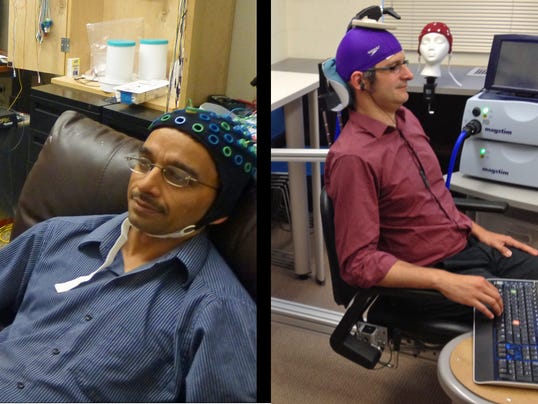
For the first time in human history, Researchers remotely controls colleague's body with brain

In the first demonstration of human brain-to-brain control, a scientist wearing an electrical brain-signal reading cap triggered motion in his colleague across campus.
On Aug. 12, University of Washington researcher Rajesh Rao sent the finger-flicking brain signal to his colleague, Andrea Stocco, in a first demonstration of human-to-human brain control, according to a university announcement.
This is freaky, and imagine someone involuntarily using your body like in Stargate Ra or Falling Skies Alien or in the Independence Day Alien?
Read more here.
Spellbinder (1995) - Season 1 full episodes - Free Online Streaming
I bet you remember the "Spellbinder" TV Series. Here's the link for it to watch free. Please spread the word, share this with your Facebook, Google+, Twitter friends.
Spellbinder - Season 1 full episodes
Robin of Sherwood (Robin Hood (1984–1986) TV Program) - Free Online Streaming Links
My previous links stopped working, so here's the new links for the "Robin of Sherwood" TV Series. Hope you enjoy. Please share with your facebook, Google+, Twitter friends.
Robin of Sherwood - Season 1 : Old Robin with Black hair :) we called the true Robin.
Robin of Sherwood - Season 2
Robin of Sherwood - Season 1 : Old Robin with Black hair :) we called the true Robin.
Robin of Sherwood - Season 2
Monday, August 12, 2013
Free WiFi calling (VoIP) app for your iOS, android phone US/Canada (No more spending your plan mintues)
* Google Voice is ending support for Talkatone. Please read my new post about alternative free WiFi calling apps
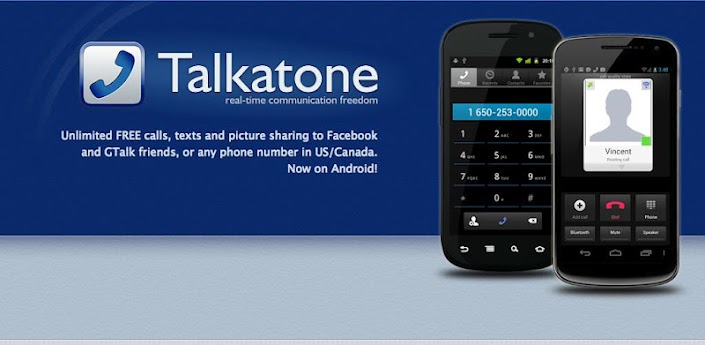
After using the free WiFi calling app "Talkatone" for more than 6 months, I'm pretty happy with the quality and its performance. Talkatone is truly a lifesaver with its free WiFi calling feature so that I don't have to use any of my minutes from the plan minutes.
I'm a happy camper and recommend to anybody who wants a free calling over your home, office or school WiFi. After I moved to AT&T $25 monthly prepaid package with 250 minutes, Talkatone saved me lots of my monthly minutes and I can't imagine how I can survive with only 250 minutes every month otherwise. I'm pretty much either at home WiFi or at Texas A&M WiFi all throughout the day, so why should I waste my minutes if I can use a calling using WiFi minutes? I was expecting the Google Voice or Rebtel are similar, but those are actually using your phone plan minutes. Another good thing is you can use your Google Voice phone number with the Talkatone because its service is based on the Google Voice.
If you want to know how to configure your android or iOS device to send/receive free calls through WiFi, please read my previous blog post, "Make free calls over wifi at US/Canada"
Hope this helps, and Enjoy!
If you like this post, please spread the word, use the options below to share this in your Facebook, Google Plus, Twitter or in blog.
After using the free WiFi calling app "Talkatone" for more than 6 months, I'm pretty happy with the quality and its performance. Talkatone is truly a lifesaver with its free WiFi calling feature so that I don't have to use any of my minutes from the plan minutes.
I'm a happy camper and recommend to anybody who wants a free calling over your home, office or school WiFi. After I moved to AT&T $25 monthly prepaid package with 250 minutes, Talkatone saved me lots of my monthly minutes and I can't imagine how I can survive with only 250 minutes every month otherwise. I'm pretty much either at home WiFi or at Texas A&M WiFi all throughout the day, so why should I waste my minutes if I can use a calling using WiFi minutes? I was expecting the Google Voice or Rebtel are similar, but those are actually using your phone plan minutes. Another good thing is you can use your Google Voice phone number with the Talkatone because its service is based on the Google Voice.
If you want to know how to configure your android or iOS device to send/receive free calls through WiFi, please read my previous blog post, "Make free calls over wifi at US/Canada"
Hope this helps, and Enjoy!
If you like this post, please spread the word, use the options below to share this in your Facebook, Google Plus, Twitter or in blog.
Sunday, August 11, 2013
Saturday, July 27, 2013
New Nexus 7 vs. Old Nexus 7
The search engine giant has officially unveiled its new flagship 7-inch tablet—a refreshed Nexus 7 with a new processor, sharper display and slightly heftier price tag.
Google has upped the price points to $229.99 for 16GB and $269.99 for 32GB, versus the $199.99 cost for the 16GB previous generation and $249.99 price tag for 32GB. The primary difference you’ll notice on the new Nexus 7 is its improved 1920 x 1200-pixel resolution display, which is a significant upgrade from the 1280 x 800 resolution on the former generation tablet.
Google has also opted for the year-old 1.5-GHz Qualcomm Snapdragon S4 Pro rather than an Nvidia chip like the 1.3GHz Tegra 3 found in the older Nexus 7. The newer ASUS-crafted tablet also comes with both rear and front facing cameras, unlike its predecessor which only featured a 1.3-megapixel front camera. The new tablet, however, comes with a 5-megapixel rear sensor and 1.2-megapixel front shooter. With 2GB of RAM, Google has also packed more memory than the 1GB of RAM found in the older model. And, of course, Google’s new tablet will be running the newest version of Android 4.3 Jelly Bean.
There’s not much of a difference in design, but Google promises that the new Nexus slate measures 0.3 inches thin and weighs 10.22 ounces—which is lighter than the 0.41-inch thin and 12-ounce older Nexus 7. For $30 more than the previous version, Google offers some minor enhancements to its affordable flagship 7-incher, but it could face stiff competition in that space with newcomers such as the ASUS MeMO Pad HD 7 arriving on the scene
Friday, March 29, 2013
'Emaciated' 4-year-old boy survives in home for days after mom dies
This is just a fine example of the life in these countries (specially USA) where people no longer speak to one another and no body cares who lives next to them or whatever happens in your next door. I'm totally saddened by the story, hope the boy will recover someday!.
I guess this is something never gonna happen in Sri Lanka, where your relatives, friends and neighbors (for good or bad) there for you always.
A New Jersey boy was found Tuesday morning locked inside an apartment with his dead mother's body.It happened on Manor Drive in Union. The boy had apparently been alone for nearly a week and had not eaten.
Authorities tell news organizations the boy said he tried to get food from the refrigerator but couldn't open the door. He also said the boy had rubbed lotion on his mother in an apparent attempt to help her, leaving behind his hand prints.
The woman was found in a bedroom, and authorities believe she had been dead for about five days. She was not identified pending notification of relatives. Police do not suspect foul play.
Neighbors reported a foul smell and alerted police. Building managers reportedly found the boy behind a chained door.He was rushed to a local hospital. His condition was unclear.
One neighbor told reporters that he hadn't seen the woman since January and didn't hear any commotion coming from the apartment. The woman, who has not been identified, is believed to have died of natural causes several days prior and the boy could not get out of the house.
Read more: http://www.myfoxny.com/story/21797791/boy-found-in-apartment-with-dead-mother#ixzz2Owm7Dh9N
I guess this is something never gonna happen in Sri Lanka, where your relatives, friends and neighbors (for good or bad) there for you always.
A New Jersey boy was found Tuesday morning locked inside an apartment with his dead mother's body.It happened on Manor Drive in Union. The boy had apparently been alone for nearly a week and had not eaten.
Authorities tell news organizations the boy said he tried to get food from the refrigerator but couldn't open the door. He also said the boy had rubbed lotion on his mother in an apparent attempt to help her, leaving behind his hand prints.
The woman was found in a bedroom, and authorities believe she had been dead for about five days. She was not identified pending notification of relatives. Police do not suspect foul play.
Neighbors reported a foul smell and alerted police. Building managers reportedly found the boy behind a chained door.He was rushed to a local hospital. His condition was unclear.
One neighbor told reporters that he hadn't seen the woman since January and didn't hear any commotion coming from the apartment. The woman, who has not been identified, is believed to have died of natural causes several days prior and the boy could not get out of the house.
Read more: http://www.myfoxny.com/story/21797791/boy-found-in-apartment-with-dead-mother#ixzz2Owm7Dh9N
How to kill Bed Bugs
Please read the "Disclaimer" before you read the method.
The best way to kill bed Bugs is to use Gasoline ( petrol/unleaded fuel), yes just spray your furniture, mattress with gazoline ( little) and wait for 24 hours, it will die from the smell you can redo this every 2 days to kill the eggs. its 100% trusted way to kill the bed Bugs, Just becareful don't smoke or turn on any electrical device that can make fire.
* Make sure to empty the entire room and wash all the cloths in hot water.
* Put some Gasoline in a spray bottle and start spraying all over the place. Make sure you cover the entire room, every inch of the place.
* Spray to your, furnitures, bed mattress and frames thoroughly.
* Open all the windows/doors and let the smell goes away. Don't use the room and mattress for couple of days. Let it air dry. If you can keep the furnitures, and mattress outside for air dry, that would be great. But if not possible, keep it for several days. The smell will eventually goes away.
* Use a vinyl mattress cover and use a double sided sticky tape to run around the mattress so that you can verify there's no more beg bugs in your room. Normally bed bugs will crawl to your bed at night, the sticky double tape can trap them for you.
Hope this helps and this really works. No more expensive exterminators :)
Disclaimer: Use it at your own risk. Any information on this blog post is for your convenience only and should not be interpreted as endorsements or recommendations by me. I cannot accept responsibility or be held liable for any loss or damage arising from using the information posted in this blog post.
The best way to kill bed Bugs is to use Gasoline ( petrol/unleaded fuel), yes just spray your furniture, mattress with gazoline ( little) and wait for 24 hours, it will die from the smell you can redo this every 2 days to kill the eggs. its 100% trusted way to kill the bed Bugs, Just becareful don't smoke or turn on any electrical device that can make fire.
* Make sure to empty the entire room and wash all the cloths in hot water.
* Put some Gasoline in a spray bottle and start spraying all over the place. Make sure you cover the entire room, every inch of the place.
* Spray to your, furnitures, bed mattress and frames thoroughly.
* Open all the windows/doors and let the smell goes away. Don't use the room and mattress for couple of days. Let it air dry. If you can keep the furnitures, and mattress outside for air dry, that would be great. But if not possible, keep it for several days. The smell will eventually goes away.
* Use a vinyl mattress cover and use a double sided sticky tape to run around the mattress so that you can verify there's no more beg bugs in your room. Normally bed bugs will crawl to your bed at night, the sticky double tape can trap them for you.
Hope this helps and this really works. No more expensive exterminators :)
Disclaimer: Use it at your own risk. Any information on this blog post is for your convenience only and should not be interpreted as endorsements or recommendations by me. I cannot accept responsibility or be held liable for any loss or damage arising from using the information posted in this blog post.
Monday, March 18, 2013
Make free calls over wifi at US/Canada (without spending your plan mintues)
* Google Voice is ending support for Talkatone. Please read my new post about alternative free WiFi calling apps
I recently went out-of-contract from the AT&T 2 year commitment, so had to decide using Pay As You Go plan. I changed my number to AT&T $25 monthly plan which is only 250 minutes every month during your rate plan period. I find myself almost in 150 minutes after the first 7 days in the plan, so I guess things getting out-of-control with the plan. I seriously need some recovery method, otherwise I'm going to be out of all my plan minutes next couple of days before the 1 month pay go period.
Before I brought the monthly no contract plan, I thought I can use Google Voice using my smartphone (iPhone 3GS), but later I realized Google Voice is not a true VOIP (voice over IP) but a forwarding service where you end up using your plan minutes. So I was looking for a true VOIP service so that I can use my WIFI service to make calls. I'm pretty much at home or at school where I have a solid WIFI networks, so if there is a true free VOIP service, then I should be able to use my iPhone to make free calls over the WIFI network without using any plan minutes so that I can save the minutes to use when I'm not in a WIFI network (while on travel etc. )
I found "Talkatone" fits my requirements, which is a true VOIP service with free calls over WIFI networks for any mobile/landline phone in US/Canada. Here's how I configured the service to make free calls using my free WIFI networks without waisting my plan minutes.
Talkatone turns your iPhone, iPod Touch, iPad or Android into a true Internet phone. It uses any data connection, WiFi or 3G/4G. You’ll be able to have high-quality phone calls even when cell phone reception is spotty and won’t use up any of your minutes. Download Talkatone if you haven't yet and I'll show you the full power of your iOS or Android device.
Requirements.
1. Google Voice Account, if you don't have one, then create one. Google voice will give you a free phone number to choose from your area. This going to be your talkatone phone number, so choose wisely.
2. Talkatone app at your iOS/Android device.
Make calls over 3G or WiFi connection
Talkatone supports 3 types of calls:
- Facebook-based Talkatone-to-Talkatone calls,
- GTalk-based Talkatone-to-Talkatone or Talkatone-to-Mac/PC calls,
- Google Voice-based calls, i.e. calls to regular telephone numbers.
I'm going to talk about Google Voice-based calls to any regular telephone number. Google Voice calls are free to US and Canada destinations, to check international rates go to Google Voice International Rates. Data charges may still apply.
1. First, visit the Google Web Voice site at voice.google.com. Login to Google Voice using your Google credentials. If you are new to Google Voice you need to setup an account and get a phone number, check Getting Started Guide if needed.
2. To setup call forwarding click on Settings menu link and select Voice Settings option:
3. Make sure the 'Forwards to Google chat' option is checked on the Voice Setting web page. The email address in option should match email address you used to Sign In w/Google account when you launched Talkatone.
Your Google Voice phone number is right above forwarding options. You'll be using this phone number to make calls and will be receiving calls to this phone number in Talkatone.
Note: If you do not want your Google Voice calls being forwarded to your phone number uncheck forwarding to your phone number.
4. Open web browser and visit the Google Mail Web site at www.gmail.com. Login to GMail using your Google credentials.
Find your contact list and click on the Call Phone action at the lower left section of the page. Make one call the phone widget in GMail to your regular phone number.
To find the Call Phone option at Gmail, you need to have the Chat option enabled. Go to Settings, Chat and enable Chat On and then save changes. Now click on the chat which is on the left bottom of your mail labels to find the Call Phone option. Opera browser is not supporting the call widget. You probably need IE or Mozilla. Make sure to install the required Google Voice plugins before you make a call. Test whether your service is working. Google talk is a true VOIP service. Talkatone is using this service to make calls free.
5. This is important, now sign out or disable the Google Chat Service. Go to Settings, Chat and Chat Off then save changes. Otherwise, you want be receiving any calls and your calls will be forwarded to Google chat instead.
6. Come back to Talkatone and tap the keypad icon. Type any phone number within the US/Canada and tap on Call button to make a free call. Call will be placed using your 3G or WiFi connection
Upon selection of a calling option call will be placed using your 3G or WiFi connection. Destination, call duration and type of network will be displayed on top.
You can mute the call, switch to keypad, turn on speaker phone, share your current location, put call on hold or access your contacts list.
Note: Talkatone is not a replacement for your regular phone and cannot be used for emergency calling.
Receive Calls using your 3G or WiFi connection
Talkatone is able to receive calls instantaneously even when the app is not active. It uses backgrounding mode introduced in iOS 4, thus Talkatone is not compatible with certain older devices.
If you want to receive calls and text messages while keeping app in background you need to have a multitasking-capable device. Currently the following devices support multitasking - iPhone 3GS/4, iPod Touch 3gen/4gen, iPad.
Note: Talkatone does not work on iPhone 3G and iPod Touch 2gen.

I recently went out-of-contract from the AT&T 2 year commitment, so had to decide using Pay As You Go plan. I changed my number to AT&T $25 monthly plan which is only 250 minutes every month during your rate plan period. I find myself almost in 150 minutes after the first 7 days in the plan, so I guess things getting out-of-control with the plan. I seriously need some recovery method, otherwise I'm going to be out of all my plan minutes next couple of days before the 1 month pay go period.
Before I brought the monthly no contract plan, I thought I can use Google Voice using my smartphone (iPhone 3GS), but later I realized Google Voice is not a true VOIP (voice over IP) but a forwarding service where you end up using your plan minutes. So I was looking for a true VOIP service so that I can use my WIFI service to make calls. I'm pretty much at home or at school where I have a solid WIFI networks, so if there is a true free VOIP service, then I should be able to use my iPhone to make free calls over the WIFI network without using any plan minutes so that I can save the minutes to use when I'm not in a WIFI network (while on travel etc. )
I found "Talkatone" fits my requirements, which is a true VOIP service with free calls over WIFI networks for any mobile/landline phone in US/Canada. Here's how I configured the service to make free calls using my free WIFI networks without waisting my plan minutes.
Talkatone turns your iPhone, iPod Touch, iPad or Android into a true Internet phone. It uses any data connection, WiFi or 3G/4G. You’ll be able to have high-quality phone calls even when cell phone reception is spotty and won’t use up any of your minutes. Download Talkatone if you haven't yet and I'll show you the full power of your iOS or Android device.
Requirements.
1. Google Voice Account, if you don't have one, then create one. Google voice will give you a free phone number to choose from your area. This going to be your talkatone phone number, so choose wisely.
2. Talkatone app at your iOS/Android device.
Make calls over 3G or WiFi connection
Talkatone supports 3 types of calls:
- Facebook-based Talkatone-to-Talkatone calls,
- GTalk-based Talkatone-to-Talkatone or Talkatone-to-Mac/PC calls,
- Google Voice-based calls, i.e. calls to regular telephone numbers.
I'm going to talk about Google Voice-based calls to any regular telephone number. Google Voice calls are free to US and Canada destinations, to check international rates go to Google Voice International Rates. Data charges may still apply.
1. First, visit the Google Web Voice site at voice.google.com. Login to Google Voice using your Google credentials. If you are new to Google Voice you need to setup an account and get a phone number, check Getting Started Guide if needed.
2. To setup call forwarding click on Settings menu link and select Voice Settings option:
3. Make sure the 'Forwards to Google chat' option is checked on the Voice Setting web page. The email address in option should match email address you used to Sign In w/Google account when you launched Talkatone.
Your Google Voice phone number is right above forwarding options. You'll be using this phone number to make calls and will be receiving calls to this phone number in Talkatone.
Note: If you do not want your Google Voice calls being forwarded to your phone number uncheck forwarding to your phone number.
4. Open web browser and visit the Google Mail Web site at www.gmail.com. Login to GMail using your Google credentials.
Find your contact list and click on the Call Phone action at the lower left section of the page. Make one call the phone widget in GMail to your regular phone number.
To find the Call Phone option at Gmail, you need to have the Chat option enabled. Go to Settings, Chat and enable Chat On and then save changes. Now click on the chat which is on the left bottom of your mail labels to find the Call Phone option. Opera browser is not supporting the call widget. You probably need IE or Mozilla. Make sure to install the required Google Voice plugins before you make a call. Test whether your service is working. Google talk is a true VOIP service. Talkatone is using this service to make calls free.
5. This is important, now sign out or disable the Google Chat Service. Go to Settings, Chat and Chat Off then save changes. Otherwise, you want be receiving any calls and your calls will be forwarded to Google chat instead.
6. Come back to Talkatone and tap the keypad icon. Type any phone number within the US/Canada and tap on Call button to make a free call. Call will be placed using your 3G or WiFi connection
Upon selection of a calling option call will be placed using your 3G or WiFi connection. Destination, call duration and type of network will be displayed on top.
You can mute the call, switch to keypad, turn on speaker phone, share your current location, put call on hold or access your contacts list.
Note: Talkatone is not a replacement for your regular phone and cannot be used for emergency calling.
Receive Calls using your 3G or WiFi connection
Talkatone is able to receive calls instantaneously even when the app is not active. It uses backgrounding mode introduced in iOS 4, thus Talkatone is not compatible with certain older devices.
If you want to receive calls and text messages while keeping app in background you need to have a multitasking-capable device. Currently the following devices support multitasking - iPhone 3GS/4, iPod Touch 3gen/4gen, iPad.
Note: Talkatone does not work on iPhone 3G and iPod Touch 2gen.
Sunday, March 17, 2013
Configure Bitbucket with Eclipse
Create Bitbucket account and repository
1. Head on over to http://bit-bucket.org and click on the giant yellow “Sign up free” button.
2. Fill out the sign up form.
3. At the top of the Bit Bucket page find the Repositories tab and mouse over it.
4. Select “Create new repository.”
5. Create your repository. (Note: Don’t forget to select “private” if you need a private repository.)
6. Select “Repositories” again from the top menu and click on the name of your newly created repository.
7. This will load a details page and you will see the url that you need to copy for interaction with this repository.
Configure eclipse
8. Fire up eclipse.
9. Find the “Help” menu on the far right of.
10. Select “Install New Software…”
11. The following software install menu should pop up.
12. On the next screen you need to enter a URL for where the plugin can be found.
The mercurial plugin for eclipse is located here:
http://cbes.javaforge.com/update
Import Repository to local
13. Now I’m going to go ahead and assume that someone has already created a repository and you are importing a project. If not than you can skip a few steps and just commit and push your repository.
14. Select the “Mercurial” folder and then “Clone Existing Mercurial Repository”
15. Enter the repository url, your username and password.
16. Go ahead and code away. Make sure to (right click and) commit any new files and folders that you create.
Content from the original article, click here.
In Eclipse select “File” > “Import”
14. Select the “Mercurial” folder and then “Clone Existing Mercurial Repository”
1. Head on over to http://bit-bucket.org and click on the giant yellow “Sign up free” button.
2. Fill out the sign up form.
3. At the top of the Bit Bucket page find the Repositories tab and mouse over it.
4. Select “Create new repository.”
5. Create your repository. (Note: Don’t forget to select “private” if you need a private repository.)
6. Select “Repositories” again from the top menu and click on the name of your newly created repository.
7. This will load a details page and you will see the url that you need to copy for interaction with this repository.
Configure eclipse
8. Fire up eclipse.
9. Find the “Help” menu on the far right of.
10. Select “Install New Software…”
11. The following software install menu should pop up.
12. On the next screen you need to enter a URL for where the plugin can be found.
The mercurial plugin for eclipse is located here:
http://cbes.javaforge.com/update
Import Repository to local
13. Now I’m going to go ahead and assume that someone has already created a repository and you are importing a project. If not than you can skip a few steps and just commit and push your repository.
14. Select the “Mercurial” folder and then “Clone Existing Mercurial Repository”
15. Enter the repository url, your username and password.
16. Go ahead and code away. Make sure to (right click and) commit any new files and folders that you create.
Content from the original article, click here.
In Eclipse select “File” > “Import”
14. Select the “Mercurial” folder and then “Clone Existing Mercurial Repository”
Thursday, March 07, 2013
Toy Hamster Trolls Russian Policeman
A Russian driver passes time driving solo by talking to a Chatimal, an interactive talking hamster toy that repeats what you say. During a routine traffic stop the Chatimal trolls a policeman by repeating what he was saying in a critter voice. The driver can’t control his laughter during the stop, even the officer cracks a smile before leaving the driver with a warning, ‘next time, no talking animals’.
I'm thinking, what will be the case in Sri Lanka? You are probably gonna end up overnight at the jail cell :)
Wednesday, March 06, 2013
Confirmed: Google Glass arrives in 2013, and under $1,500
“OK glass…”
Get ready to hear that a lot.
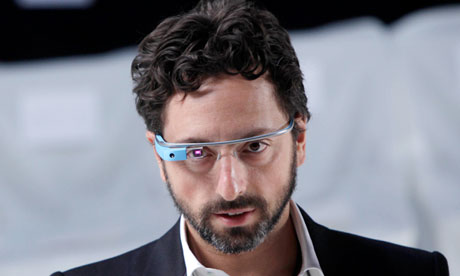
Google Glass is Google’s new video-recording, photo-taking, GPS, social networking, everything-a-smart-phone-does gadget. If you haven’t heard of it, it’s essentially a tiny computer device attached to a lens and mounted on a pair of wire glasses. It’s a next-generation technology — largely voice controlled, hands-free, super-innovative and a little like something out of science fiction: utter “OK glass…” followed by a command and you activate the device.
I wasn’t aware that Google’s R&D department has taken futuristic forays like this before, working on such things as self-driving cars, for example, but this new communications headset might really hit the big time, and soon. It hasn’t even been a month since the unveiling of the Explorer program, an aggressive beta initiative of the Google Glass project, but Google is already saying they hope to get their product out to consumers in the very near future. Steve Lee, Glass’s product director, told a reporter that he expects Google to deliver by the end of this year.
Ambitious deadline aside, there is one all-important question remaining: will this product actually take off?
Google’s platform on Glass sounds reasonable. Google hopes that Glass will be “technology that’s there for you all the time, but not.” In other words, you’ll be wearing your smart phone on your head 24/7, but you can activate it only when you need it, without having to fumble around in your pocket or look down at a screen — all it takes is a voice command, a movement of the head or a swipe of your finger (the side of the device is actually a touchscreen).
Everything you see — the menus, the weather, your mom’s texts — is projected on the lens right in a corner of your field of vision. Likewise, whatever you see, exactly as you see it, can be recorded by the device.
Capturing a moment will no longer require you to look through a middleman technology, like a camera or your phone. You can document your field of vision with one simple command, which is both neat and scary.
Obviously, one of the big issues Google Glass has to deal with in the public eye is its unsettling potential to eradicate privacy. After all, if people buy into this, everyone will be walking around with a camera strapped to their heads, able to record anyone else in just a wink. People already feel vulnerable to recording as it is because of smartphones, so how will they feel about Google Glass?
Eventually, they’ll get over it. This thing could change social norms; it could go the way of the early 2000s phenomenon where we wondered whether passersby muttering into their Bluetooth devices were crazy. Ultimately, I expect everyone will get used to Google Glass and that the elegance, innovation and “sci-fi” appeal of Glass will be too difficult to resist.
“OK glass, look cool.” This, by far, seems to be the command Google Glass will find hardest to obey. At the end of the day, as technologically awesome as Glass is, it still looks like a thick-rimmed pair of glasses with most of the parts missing — like glasses without the glasses, so that what you end up wearing is a wide metallic bar across your brow. With the lens hanging over part of one eye, Google Glass reminds me of the power-level readers from Dragonball Z (for those of you who grew up watching Toonami).
Such a look is bound to earn you some weird looks, at least if you’re going to be the first to own such an avant-garde piece of equipment.
Nevertheless, I think this is another hurdle that Google is going to overcome by the sheer force of the project’s other cool features. It could be the next big thing, and if not, at least it’s daring.
—Writer, Luben Raytchev is a junior from Marietta majoring in biology and English
Read the original article here.
Get ready to hear that a lot.
Google Glass is Google’s new video-recording, photo-taking, GPS, social networking, everything-a-smart-phone-does gadget. If you haven’t heard of it, it’s essentially a tiny computer device attached to a lens and mounted on a pair of wire glasses. It’s a next-generation technology — largely voice controlled, hands-free, super-innovative and a little like something out of science fiction: utter “OK glass…” followed by a command and you activate the device.
I wasn’t aware that Google’s R&D department has taken futuristic forays like this before, working on such things as self-driving cars, for example, but this new communications headset might really hit the big time, and soon. It hasn’t even been a month since the unveiling of the Explorer program, an aggressive beta initiative of the Google Glass project, but Google is already saying they hope to get their product out to consumers in the very near future. Steve Lee, Glass’s product director, told a reporter that he expects Google to deliver by the end of this year.
Ambitious deadline aside, there is one all-important question remaining: will this product actually take off?
Google’s platform on Glass sounds reasonable. Google hopes that Glass will be “technology that’s there for you all the time, but not.” In other words, you’ll be wearing your smart phone on your head 24/7, but you can activate it only when you need it, without having to fumble around in your pocket or look down at a screen — all it takes is a voice command, a movement of the head or a swipe of your finger (the side of the device is actually a touchscreen).
Everything you see — the menus, the weather, your mom’s texts — is projected on the lens right in a corner of your field of vision. Likewise, whatever you see, exactly as you see it, can be recorded by the device.
Capturing a moment will no longer require you to look through a middleman technology, like a camera or your phone. You can document your field of vision with one simple command, which is both neat and scary.
Obviously, one of the big issues Google Glass has to deal with in the public eye is its unsettling potential to eradicate privacy. After all, if people buy into this, everyone will be walking around with a camera strapped to their heads, able to record anyone else in just a wink. People already feel vulnerable to recording as it is because of smartphones, so how will they feel about Google Glass?
Eventually, they’ll get over it. This thing could change social norms; it could go the way of the early 2000s phenomenon where we wondered whether passersby muttering into their Bluetooth devices were crazy. Ultimately, I expect everyone will get used to Google Glass and that the elegance, innovation and “sci-fi” appeal of Glass will be too difficult to resist.
“OK glass, look cool.” This, by far, seems to be the command Google Glass will find hardest to obey. At the end of the day, as technologically awesome as Glass is, it still looks like a thick-rimmed pair of glasses with most of the parts missing — like glasses without the glasses, so that what you end up wearing is a wide metallic bar across your brow. With the lens hanging over part of one eye, Google Glass reminds me of the power-level readers from Dragonball Z (for those of you who grew up watching Toonami).
Such a look is bound to earn you some weird looks, at least if you’re going to be the first to own such an avant-garde piece of equipment.
Nevertheless, I think this is another hurdle that Google is going to overcome by the sheer force of the project’s other cool features. It could be the next big thing, and if not, at least it’s daring.
—Writer, Luben Raytchev is a junior from Marietta majoring in biology and English
Read the original article here.
Tuesday, March 05, 2013
Samsung’s next big smartphone, Galaxy S IV will have Eye Tracking
After all, my predictions for the technologies beyond 2010 is becoming a reality. Eye tracking is going to be the next big thing including the eye tracking capabilities in consumer products like Microsoft Kinect, Google Glass and now Samsung Galaxy S IV with eye tracking. If you don't know what is eye tracking, then try to fresh your mind with the movie "Minority Report" eye scan.
Eye tracking is a far superior technique than eye scan or retina scan, where it is the measuring either the point of gaze (where one is looking) or the motion of an eye (eye movements or saccades and fixations) relative to the head. So, with this technology, it is extremely unlikely to bypass a security system which require live eyes to detect the eye movements, pupil dilations and other factors which are related to unique specifics of a human. Wanna read more, check out my Biometrics using Eye Movements paper
Samsung’s next big smartphone, to be introduced this month, will have a strong focus on software. A person who has tried the phone, called the Galaxy S IV, described one feature as particularly new and exciting: Eye scrolling or eye tracking.
The phone will track a user’s eyes to determine where to scroll, said a Samsung employee who spoke on condition of anonymity. For example, when users read articles and their eyes reach the bottom of the page, the software will automatically scroll down to reveal the next paragraphs of text.
The source would not explain what technology was being used to track eye movements, nor did he say whether the feature would be demonstrated at the Galaxy S IV press conference, which will be held in New York on March 14. The Samsung employee said that over all, the software features of the new phone outweighed the importance of the hardware.
Indeed, Samsung in January filed for a trademark in Europe for the name “Eye Scroll” (No. 011510674). It filed for the “Samsung Eye Scroll” trademark in the United States in February, where it described the service as “Computer application software having a feature of sensing eye movements and scrolling displays of mobile devices, namely, mobile phones, smart-phones and tablet computers according to eye movements; digital cameras; mobile telephones; smart-phones; tablet computers.”
Samsung has also filed for the trademark “Eye Pause,” without describing what the feature does.
In an interview, Kevin Packingham, Samsung’s chief product officer, declined to share details about Samsung’s next phone. But he said he disagreed that the new hardware would be insignificant compared with the software, and over all, “It’s an amazing phone.”
Eye tracking systems have been in development for a while. Samsung’s current flagship phone, the Galaxy S III, already has a feature that watches you. The feature, Smart Stay, uses its front-facing camera to know to keep the screen lit up when a person is looking at it instead of dimming it automatically.
Tobii, a technology company that received $21 million in funding from Intel last year, has been working on a technique that uses infrared sensors to track precise eye movements.
Samsung’s Galaxy S III has been the company’s best-selling phone, so the release of its next flagship phone has been highly anticipated.
Eye tracking is a far superior technique than eye scan or retina scan, where it is the measuring either the point of gaze (where one is looking) or the motion of an eye (eye movements or saccades and fixations) relative to the head. So, with this technology, it is extremely unlikely to bypass a security system which require live eyes to detect the eye movements, pupil dilations and other factors which are related to unique specifics of a human. Wanna read more, check out my Biometrics using Eye Movements paper
Samsung’s next big smartphone, to be introduced this month, will have a strong focus on software. A person who has tried the phone, called the Galaxy S IV, described one feature as particularly new and exciting: Eye scrolling or eye tracking.
The phone will track a user’s eyes to determine where to scroll, said a Samsung employee who spoke on condition of anonymity. For example, when users read articles and their eyes reach the bottom of the page, the software will automatically scroll down to reveal the next paragraphs of text.
The source would not explain what technology was being used to track eye movements, nor did he say whether the feature would be demonstrated at the Galaxy S IV press conference, which will be held in New York on March 14. The Samsung employee said that over all, the software features of the new phone outweighed the importance of the hardware.
Indeed, Samsung in January filed for a trademark in Europe for the name “Eye Scroll” (No. 011510674). It filed for the “Samsung Eye Scroll” trademark in the United States in February, where it described the service as “Computer application software having a feature of sensing eye movements and scrolling displays of mobile devices, namely, mobile phones, smart-phones and tablet computers according to eye movements; digital cameras; mobile telephones; smart-phones; tablet computers.”
Samsung has also filed for the trademark “Eye Pause,” without describing what the feature does.
In an interview, Kevin Packingham, Samsung’s chief product officer, declined to share details about Samsung’s next phone. But he said he disagreed that the new hardware would be insignificant compared with the software, and over all, “It’s an amazing phone.”
Eye tracking systems have been in development for a while. Samsung’s current flagship phone, the Galaxy S III, already has a feature that watches you. The feature, Smart Stay, uses its front-facing camera to know to keep the screen lit up when a person is looking at it instead of dimming it automatically.
Tobii, a technology company that received $21 million in funding from Intel last year, has been working on a technique that uses infrared sensors to track precise eye movements.
Samsung’s Galaxy S III has been the company’s best-selling phone, so the release of its next flagship phone has been highly anticipated.
Sunday, March 03, 2013
New York baby delivered after car crash kills parents
I'm not sure whether I should be happy or sad. I'm happy the baby is safe, but sad he never gonna see his parents again. I'm hoping there's some grand-parents in either side who can help this kid.
A New York couple expecting their first child have been killed in a car crash on their way to hospital, but the unborn baby survived the accident.
Nachman and Raizy Glauber, both 21, were travelling in a taxi in Brooklyn when it was involved in a collision with another car close to their home.
Both were pronounced dead in hospital but the premature infant was delivered alive, police said.
Police are seeking the driver of the other car, who fled the scene on foot.
The driver of the taxi in which the Glaubers were travelling was in a stable condition in hospital, police said.
The crash happened shortly after midnight a few blocks from the Glaubers' home in the Williamsburg area of Brooklyn.
The trip to hospital was related to Mrs Glauber's pregnancy but it is not clear if they were going there for the child's birth. The cause of the crash is under investigation and police are looking for the driver and a passenger in the other car, who fled the scene.
The Glaubers were members of Brooklyn's ultra-orthodox Jewish community - the largest in the world outside Israel. "It's a terrible, terrible tragedy," community leader Rabbi Bernard Freilich told the New York Post. "They were going for their first child. There are no words, I don't even know what to say."
Click here for the original news story.
A New York couple expecting their first child have been killed in a car crash on their way to hospital, but the unborn baby survived the accident.
Nachman and Raizy Glauber, both 21, were travelling in a taxi in Brooklyn when it was involved in a collision with another car close to their home.
Both were pronounced dead in hospital but the premature infant was delivered alive, police said.
Police are seeking the driver of the other car, who fled the scene on foot.
The driver of the taxi in which the Glaubers were travelling was in a stable condition in hospital, police said.
The crash happened shortly after midnight a few blocks from the Glaubers' home in the Williamsburg area of Brooklyn.
The trip to hospital was related to Mrs Glauber's pregnancy but it is not clear if they were going there for the child's birth. The cause of the crash is under investigation and police are looking for the driver and a passenger in the other car, who fled the scene.
The Glaubers were members of Brooklyn's ultra-orthodox Jewish community - the largest in the world outside Israel. "It's a terrible, terrible tragedy," community leader Rabbi Bernard Freilich told the New York Post. "They were going for their first child. There are no words, I don't even know what to say."
Click here for the original news story.
Saturday, March 02, 2013
YouTube’s ‘Do the Harlem Shake’ Easter Egg
Tired of looking through Harlem Shake videos on YouTube? Google is here again to keep things interesting and probably make you smile.
Remember, your browser should be Chrome or Mozilla. My Opera browser is not doing this Easter Egg.
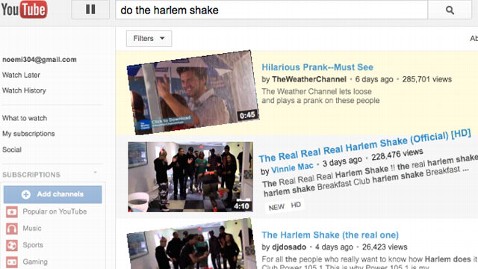
Type “Do the Harlem Shake” into a YouTube search query. What you’ll get is YouTube’s own rendition of the Harlem Shake — with thumping music, spinning panels, and the whole page shaking to the beat.
Or you can click this link "Do the Harlem Shake"
(Take couple of minute to try it. Then, please, come back.)
Google is no amateur at spicing up its sites with amusing so-called Easter Eggs. Who could forget “Do a Barrel Roll” or “Zerg Rush“? But with today’s YouTube Easter Egg, Google displays a more broad sense of humor, possibly appealing to folks beyond the geek mold. Unless you’ve been living under a rock for the past several weeks, you’ve probably heard of the Harlem Shake as the Billboard-topping phenomenon, or, as others might put it, that thing that happened after Gangnam Style.
Google promises to keep the Google Doodles and Easter Eggs coming.
Remember, your browser should be Chrome or Mozilla. My Opera browser is not doing this Easter Egg.
Type “Do the Harlem Shake” into a YouTube search query. What you’ll get is YouTube’s own rendition of the Harlem Shake — with thumping music, spinning panels, and the whole page shaking to the beat.
Or you can click this link "Do the Harlem Shake"
(Take couple of minute to try it. Then, please, come back.)
Google is no amateur at spicing up its sites with amusing so-called Easter Eggs. Who could forget “Do a Barrel Roll” or “Zerg Rush“? But with today’s YouTube Easter Egg, Google displays a more broad sense of humor, possibly appealing to folks beyond the geek mold. Unless you’ve been living under a rock for the past several weeks, you’ve probably heard of the Harlem Shake as the Billboard-topping phenomenon, or, as others might put it, that thing that happened after Gangnam Style.
Google promises to keep the Google Doodles and Easter Eggs coming.
Thursday, February 21, 2013
Enable EndNote in Microsoft word toolbar (EndNote X6 and Microsoft Word 2010 32bit)
If your EndNote menu is missing from Microsoft word toolbar, then here's how to enable it again.
Make sure your Microsoft word version is compatible with EndNote version. I have Microsoft word 2010 32 bit version and EndNote X6. Remember there is a problem with word 2010 64 bit which is not supported by EndNote. I'm not sure it is currently resolved or not but if thats the case this solution will not work.
You can check your word version by going to the File>Help where you can see the Office version.
Now here's how to enable the EndNote Add-Ins.
Make sure your Microsoft word version is compatible with EndNote version. I have Microsoft word 2010 32 bit version and EndNote X6. Remember there is a problem with word 2010 64 bit which is not supported by EndNote. I'm not sure it is currently resolved or not but if thats the case this solution will not work.
You can check your word version by going to the File>Help where you can see the Office version.
Now here's how to enable the EndNote Add-Ins.
- Click "File" then click on "Options"
- Click "Add-Ins" from the list
- Select "COM Add-Ins" from the drop down list next to Manage at the bottom of this Add-Ins and then click "Go" button
- Now you can see the EndNote Add-In in the given list and make sure that Add-in is checked.
Subscribe to:
Posts (Atom)